
Key Takeaways:
- The main difference between open source and cloud based LMS platforms is control: open source gives organizations greater control over the source code, hosting, and customization, while cloud based platforms are managed by the provider.
- Open source LMS platforms offer deeper customization but require more technical resources for hosting, security, updates, and maintenance.
- Cloud based LMS platforms provide faster deployment, easier maintenance, and scalable access with less internal IT involvement.

A cloud based LMS is usually the better choice for organizations that want faster implementation, lower IT workload, automatic maintenance, and easier scalability. An open source LMS is better for organizations that need deeper customization, greater control over their learning environment, and the technical resources to manage it.
Both models can deliver courses, assessments, learner tracking, reporting, and online training. The key difference is where the platform is managed and how much control your organization has over its technology, data, and configuration.
In this blog, we focus on the two models most organizations compare today: Open LMS and Cloud Based LMS. Understanding how they differ in hosting, customization, scalability, security, maintenance, and overall cost helps you choose the system that fits your learning strategy.
What Is The Difference Between Open Source And Cloud Based LMS?
The main difference between open source and cloud-based LMS is control and management. An open source LMS gives organizations greater control over the source code, hosting, customization, and data, while a cloud based LMS is hosted and maintained by the provider, offering faster deployment, automatic updates, and lower IT maintenance.
What Is An Open Source LMS?
An open source Learning Management System (LMS) provides access to its underlying source code, allowing organizations to modify the software according to their requirements. Unlike a fully managed SaaS platform, an open source learning platform can be hosted and configured by the organization or an implementation partner.
Open source model gives teams greater control over the learning environment, user management, course structure, integrations, data storage, and system configuration.
For organizations with specialized workflows, that flexibility can make it easier to build a digital learning environment around existing processes rather than adapting those processes to a fixed platform.
Benefits Of An Open Source LMS
- Greater customization: Access to the source code allows technical teams to modify interfaces, workflows, assessments, integrations, and other platform components.
- More control over hosting: Organizations can choose their hosting environment and determine how learning data is stored and managed.
- Flexible integrations: Development teams can connect the platform with HR systems, student information systems, identity providers, content libraries, and other business applications.
- Greater data control: Self hosted environments can give organizations more direct control over learner records, backups, permissions, and data migration.
- Extensible functionality: Plugins, extensions, and custom development can expand the capabilities of the learning platform as training requirements evolve.
- Reduced software licensing costs: Many open source solutions do not charge a traditional license fee for the core software. However, organizations still need to account for hosting, implementation, development, security, and maintenance.
Read more: Cloud LMS vs On-Premise LMS
Limitations Of An Open Source LMS
- Technical expertise is required: Your organization or an implementation partner needs to manage configuration, hosting, updates, integrations, and troubleshooting.
- Implementation can take longer: Custom development and infrastructure setup can increase the time required to launch the platform.
- Operating costs can increase: Free or low cost software does not mean zero cost. Developers, hosting, security, support, and ongoing maintenance contribute to the total cost of ownership.
- Security requires active management: Organizations are responsible for applying updates, managing permissions, protecting infrastructure, and maintaining appropriate security controls.
- Support depends on your setup: Technical assistance may come from internal IT teams, community resources, or specialist partners rather than a single software provider.
Who Should Choose An Open Source LMS?
An open source learning platform is generally suitable for universities, large enterprises, regulated organizations, and training providers that require extensive customization and have access to technical resources.
It can be particularly valuable when data control, custom workflows, system integrations, and hosting flexibility are more important than having a fully managed service.
Read more: 10 LMS Red Flags to Look Out for When Choosing a Learning Platform
What Is A Cloud-Based (SaaS) LMS?
A cloud-based LMS (SaaS LMS) is a hosted learning management system where the technology infrastructure is managed by a third party. Organizations access the platform through the internet instead of maintaining their own LMS servers.
Most cloud learning platforms use a Software as a Service (SaaS) model. The provider typically manages hosting, infrastructure, software updates, backups, maintenance, and platform availability.
This allows internal teams to spend more time on course development, learner engagement, assessments, and training outcomes instead of managing the underlying technology.
Benefits Of A Cloud-Based LMS
- Faster implementation: Organizations can begin delivering training without setting up their own servers or infrastructure.
- Lower IT workload: The provider manages much of the technical maintenance, including hosting, updates, and infrastructure management.
- Easy learner access: Employees, students, and other learners can access training through internet connected devices, supporting remote and hybrid learning.
- Simpler scalability: Organizations can generally add users, courses, and learning programs without expanding their own server infrastructure.
- Automatic platform updates: The provider typically manages software improvements, bug fixes, and security patches.
- Built in learning capabilities: Modern SaaS learning platforms can combine course management, assessments, learner tracking, analytics, automation, and integrations within one environment.
- Professional support: Cloud LMS providers commonly offer onboarding, documentation, technical support, and customer success resources.
Read more: How Corporate LMS Technology Supports Workforce Upskilling?
Limitations Of A Cloud-Based LMS
- Recurring subscription costs: Organizations usually pay monthly or annual fees, which can increase as users, storage, or premium capabilities grow.
- Limited source code access: Organizations generally cannot modify the underlying software in the same way they can with an open source solution.
- Greater vendor dependency: Platform availability, pricing, product updates, and feature development depend on the provider.
- Integration constraints: Standard integrations may be available, but highly specialized workflows can require additional development or third party tools.
- Less control over infrastructure: Organizations need to evaluate how the provider handles data storage, backups, security, privacy, and compliance.
Read more: 7 key LMS metrics you should track but are missing
Who Should Choose A Cloud-Based LMS?
A cloud based learning platform is often a strong fit for corporations, schools & colleges, training providers, and growing businesses that want to launch digital training without building an internal technology infrastructure.
It is particularly suitable when an organization prioritizes fast deployment, ease of administration, accessibility, scalability, managed maintenance, and vendor support.
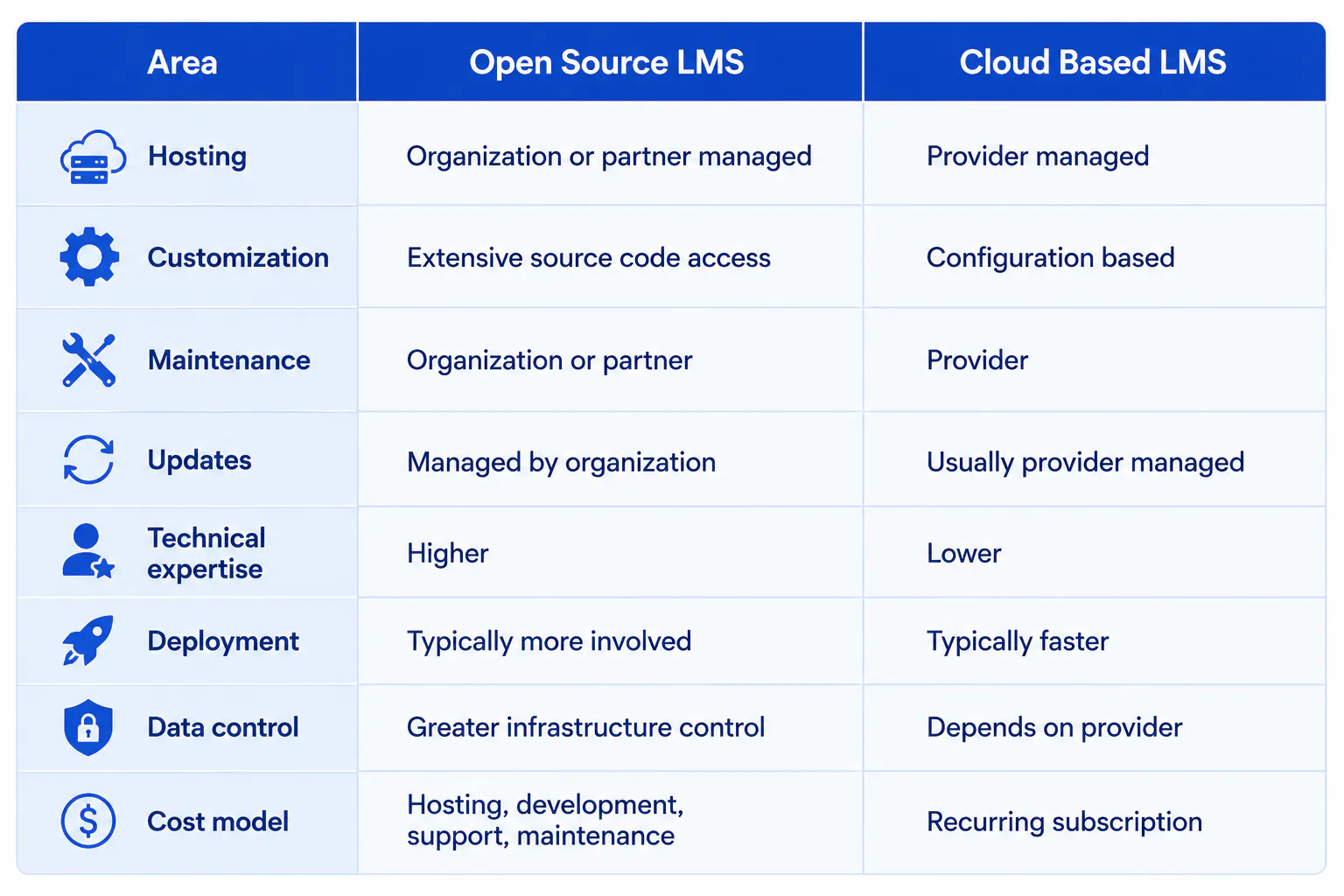
Open Source LMS Vs Cloud-Based LMS: Main Differences
The two models can deliver similar learning outcomes, but they differ significantly in how the technology is owned, managed, and maintained.
Open Source LMS Or Cloud-Based LMS: Which Should You Choose?
The right model depends on how your organization delivers learning, how much technical control it requires, and the resources available to manage the platform.
An open source solution makes more sense when your organization needs extensive customization, specialized integrations, control over hosting, or greater authority over the underlying technology.
A cloud based platform is generally more suitable when your priority is to launch quickly, reduce internal IT responsibilities, simplify maintenance, and scale training without managing infrastructure.
Before making a decision, evaluate both options against these areas:
- Customization and workflow requirements
- Total cost of ownership
- Internal IT capabilities
- Data governance and security
- Integration requirements
- Number and type of learners
- Reporting and learning analytics
- Implementation timeline
- Vendor and technical support
- Future scalability
Read more: Top 7 LMS Implementation Problems and How to Solve them
Conclusion
Open source and cloud-based LMS platforms both support modern digital learning, but they approach learning management differently. Open source platforms prioritize control and customization, while cloud based platforms prioritize accessibility, managed infrastructure, and ease of administration.
The right learning environment should give learners a consistent experience while helping instructors and administrators deliver content, manage assessments, track progress, and improve training outcomes. As learning needs evolve, flexibility, security, integrations, and scalability will remain important factors in the effectiveness of any LMS.
