
Key Takeaways
- An LMS centralizes employee onboarding by bringing courses, learning paths, assessments, resources, and progress tracking into one platform.
- Role-based training improves onboarding relevance by giving employees learning aligned with their responsibilities, skills, and department requirements.
- Onboarding can extend into continuous development through ongoing compliance training, upskilling, product education, and professional learning.
Employee onboarding prepares new hires to understand the organization, perform their responsibilities, use workplace systems, and become productive in their roles.
A Corporate LMS provides exactly that. By offering role-based learning paths, interactive modules, and performance tracking, an LMS equips new hires with the knowledge and skills they need to succeed quickly.
In this blog, you will learn how to use an LMS for onboarding, create personalized learning experiences, and accelerate employee readiness while reducing administrative overhead.
What Is An Onboarding LMS?
An onboarding LMS is a learning management system that delivers, organizes, and tracks training for new employees. HR and training teams can use it to create courses, assign learning paths, deliver assessments, organize employees, and monitor progress from one platform.
The system connects onboarding requirements with relevant learning activities, including company orientation, policies, compliance training, and role-specific education. For example, sales employees may receive product and CRM training, while finance employees may receive accounting and compliance training.
An onboarding LMS can also support continuous employee development through product updates, compliance refreshers, technical training, leadership programs, and professional learning after the initial onboarding period.
Why Use an LMS for Onboarding
- Streamlines Training: An LMS centralizes all onboarding materials, letting new hires access policies, role guides, and tasks anytime.
- Boosts Engagement: Interactive tools such as videos, quizzes, and simulations improve learning retention and help employees understand their roles more quickly.
- Tracks Progress Effectively: LMS analytics reveal who is keeping up and where support is needed. According to Brandon Hall Group organizations using structured onboarding see 82% higher retention and 70% higher productivity.
- Scales Easily: Workforce onboarding platforms allow simultaneous onboarding of multiple employees across locations, supporting both in-office and remote teams efficiently.
What Are the Benefits Of Using An LMS For Onboarding?
An LMS connects onboarding training, employee progress, and learning outcomes in one system. For HR and L&D teams, the main benefits include:
- Improves employee retention: Structured onboarding helps new hires understand their roles and expectations.
- Increases engagement: Videos, quizzes, microlearning, and interactive activities make training more engaging.
- Tracks learning progress: HR teams can monitor completion, assessment results, and onboarding milestones.
- Supports employee growth: The platform can continue delivering training and upskilling after onboarding.
- Centralizes knowledge: Policies, processes, product information, and training resources stay in one place.
- Evaluates new-hire readiness: Assessments and learning data reveal knowledge gaps and additional training needs.
- Reduces onboarding costs: Reusable digital training reduces repeated sessions, printed materials, and manual administration.
Read more: Top 10 LMS Challenges and How to Overcome Them
How Do You Use An LMS For Onboarding?
An effective onboarding program should move employees from organizational introduction to role-specific knowledge and eventually to demonstrated job readiness.
HR teams can structure the learning journey around employee requirements, training objectives, practical activities, assessments, and progress data.
1. Start Onboarding Before The First Day
Pre-boarding introduces new employees to essential information before the first working day.
HR teams can provide company introductions, organizational information, workplace policies, communication guidelines, and first-day instructions through the learning platform.
Pre-boarding content should remain focused on information employees need before joining. A large volume of mandatory training can create unnecessary cognitive load before the employee has entered the workplace.
A short introductory learning path can prepare employees for the first day while leaving detailed role training for the appropriate stage of onboarding.
2. Create A Structured Onboarding Program
A structured onboarding program organizes training into a logical sequence.
Common onboarding components include:
- Company orientation
- Workplace policies
- Compliance training
- Product or service knowledge
- Department training
- Role responsibilities
- Business systems
- Workplace processes
- Assessments
- Manager or mentor sessions
Company orientation establishes organizational context before employees begin role-specific education. Systems training can follow process education when employees need to understand why a tool is used before learning how to operate it.
A logical sequence reduces disconnected learning and gives employees a clearer progression through onboarding.
Read more: 7 Reasons to Use an LMS for Your Organization
3. Assign Role-Specific Learning Paths
Role-specific learning paths connect employee responsibilities with relevant training.
HR teams can create separate learning paths for sales, finance, marketing, operations, customer support, technology, and management teams.
A new sales representative may receive product education, CRM training, sales methodology, customer communication, and pricing knowledge.
A new software developer may receive development workflows, security procedures, technical documentation, coding standards, and software tools.
Role-specific paths allow organizations to maintain common organizational training without forcing every employee to complete identical job training.
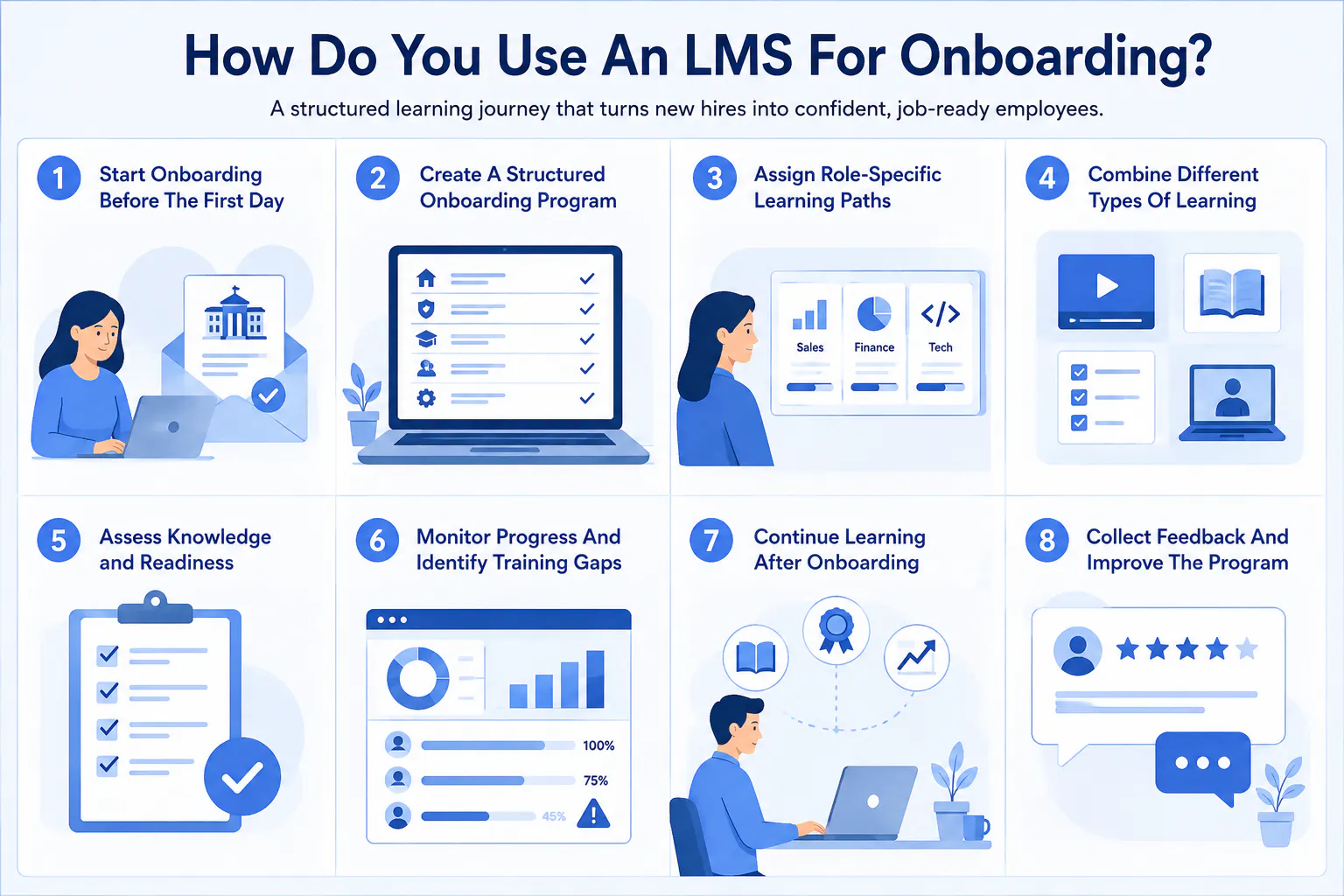
4. Combine Different Types Of Learning
Effective onboarding combines learning formats according to the intended learning outcome.
A policy course may use written material because employees need access to precise requirements. A software course may use video demonstrations because employees need to observe a workflow. A product course may use quizzes because product knowledge needs to be assessed. A role-specific program may use practical assignments because employees need to demonstrate application.
An LMS can place each activity within the appropriate learning path.
Employees can therefore progress from receiving information to understanding concepts, demonstrating knowledge, and applying skills.
5. Assess Knowledge And Readiness
Assessments provide evidence of employee understanding.
Compliance courses can use quizzes to test knowledge of workplace requirements. Product courses can evaluate product knowledge. Role-specific courses can use assignments to assess practical application.
Assessment results help HR teams and managers distinguish between course participation and demonstrated understanding.
Course completion indicates that an employee finished an assigned learning activity. Assessment performance provides evidence of how well the employee understood the material.
Practical assessments provide additional evidence when a role requires employees to demonstrate a process, use a system, or apply a skill.
Read more: How Corporate LMS Technology Supports Workforce Upskilling?
6. Monitor Progress And Identify Training Gaps
LMS reports provide HR teams and managers with information about employee learning activity.
Useful onboarding metrics include:
- Course completion
- Assessment results
- Outstanding activities
- Training participation
- Learning progress
- Knowledge gaps
An incomplete course can indicate a scheduling or engagement issue. A low assessment score can indicate a knowledge gap. Repeated difficulties across several employees can indicate a problem with the training content itself.
HR teams can use individual learning data to support employees. Training teams can use aggregated data to improve the onboarding program.
Read more: 10 Employee Training Metrics Every L&D Team Should Track
7. Continue Learning After Onboarding
Employee development continues after initial onboarding.
Organizations can use the same learning environment for advanced role training, product updates, technical education, compliance refreshers, leadership development, and professional learning.
A new employee may initially learn how to use a business system and later complete advanced training as their responsibilities increase.
Connecting onboarding with continuous learning gives employees a consistent learning environment throughout their development within the organization.
8. Collect Feedback And Improve The Program
Employee feedback provides information that completion data and assessment scores cannot fully capture.
HR teams can collect feedback about course relevance, content clarity, assessment difficulty, learning formats, missing information, and areas where employees required additional support.
For example, employees may consistently report that a particular workflow is difficult to understand. Training teams can respond by adding a demonstration, rewriting the explanation, or introducing a practical exercise.
Employee feedback therefore becomes an input for updating onboarding content and improving future training programs.
Read more: 9 Common LMS Mistakes to Avoid for Better Training Results
7 Onboarding LMS Features To Prioritize
The right onboarding LMS features should support training delivery, employee assignment, assessment, progress tracking, reporting, and continued learning.
- Role-based learning paths: Assign training based on employee roles, departments, experience levels, and skill requirements.
- Training module creation: Build courses covering company policies, processes, products, compliance, systems, and role-specific knowledge.
- Assessments and quizzes: Test employee knowledge and practical understanding through quizzes, tests, and assignments.
- Employee progress tracking: Monitor course completion, learning activity, assessment performance, and outstanding training.
- Reporting and analytics: Measure completion rates, assessment results, participation, and learning performance across employees and teams.
- Cohort and group management: Organize employees by role, department, location, joining date, or onboarding cohort.
- Live learning support: Combine self-paced courses with instructor-led sessions, demonstrations, discussions, and practical training.
Read more: Top 10 Features to Look for in an LMS in 2026
What Are the Best Employee Onboarding Practices?
Effective onboarding combines relevant training, practical application, and continuous measurement.
- Make onboarding role-specific: Keep company-wide training consistent while assigning role-specific courses based on employee responsibilities and required skills.
- Break onboarding into manageable stages: Structure learning across pre-boarding, the first day, the first week, role training, and continued development.
- Combine learning with practical activities: Use assignments, demonstrations, simulations, live sessions, and role-specific tasks to reinforce learning.
- Measure and improve continuously: Use completion data, assessment results, employee feedback, and manager observations to identify gaps and improve the program.
Conclusion
An LMS for employee onboarding centralizes training, role-specific learning, assessments, progress tracking, and employee development.
Effective onboarding combines structured learning paths, practical activities, assessments, and progress data to build employee knowledge and role readiness.
With features such as role-based training, reporting, cohort management, live learning, and compliance tracking, organizations can create a consistent onboarding experience that continues into long-term employee development.

