
Key Takeaways
- An LMS administrator manages users, roles, courses, cohorts, access, and platform settings to keep the learning environment organized.
- In K-12 schools, the LMS administrator supports teachers, students, and school leadership by maintaining access, course structures, learning activity visibility, and administrative operations.
- The role combines LMS knowledge, organization, communication, and data skills to maintain consistent learning operations and support effective use of the platform.

An LMS administrator manages the people, learning spaces, access controls, courses, and operational settings within a learning management system. In a school, this role helps maintain the digital environment used by teachers, students, and administrators.
The role can also be described as a learning management system administrator, LMS admin, or learning platform administrator. While the title varies, the underlying responsibility is similar: keeping the platform structured, accessible, and aligned with how the organization delivers learning.
In this blog, you will get to know what an LMS administrator does, their responsibilities in schools, the skills they need, how the role differs from an LMS manager and teacher, and how they support the learning process.
What Is an LMS Administrator?
An LMS administrator is the person responsible for configuring, managing, and maintaining a school learning management system so that teachers, students, and other authorized users can access and use the platform effectively.
The role typically covers:
- User and role management: Creating users and assigning appropriate roles and permissions.
- Course administration: Managing courses, learning spaces, availability, and access.
- Access control: Ensuring users can reach the learning spaces and information relevant to their roles.
- Platform configuration: Maintaining administrative settings, controls, and dashboard layouts.
- Learning activity oversight: Reviewing available information about learner activity and progress.
- Administrative reporting: Accessing relevant learning and assessment information for operational oversight.
- Operational support: Resolving platform-related access and workflow issues for users.
The role is different from other positions that interact with the same platform.
A teacher focuses on instruction, learner engagement, assignments, grading, and course activities. A student uses the platform to access courses, complete learning activities, and participate in assessments. A school administrator oversees broader academic and operational functions across the institution.
An IT administrator has a different scope again. IT responsibilities generally involve technical infrastructure such as devices, networks, systems, and organizational technology. An LMS administrator focuses specifically on the operation of the learning platform and its learning-related workflows.
Why Is an LMS Administrator Important for Schools?
An LMS administrator gives the school clear ownership of its digital learning operations.
The role supports:
- Consistent access: Users receive the appropriate access to courses and learning spaces.
- Clear role separation: Teachers, students, and administrators work within appropriate permissions.
- Organized courses and cohorts: Learning spaces and learner groups remain structured.
- Teacher-administrator coordination: Platform operations support instructional workflows.
- Centralized learning operations: Users, courses, cohorts, and access can be managed within one environment.
- Reliable learning visibility: Authorized users can access relevant information about activity, progress, and assessment performance.
For K-12 schools, this becomes increasingly important as digital learning expands across grades, subjects, teachers, and student groups.
What Does an LMS Administrator Do?
The responsibilities of a learning management system administrator can be grouped around the main operational areas of the platform.
Manage Users, Roles, and Access
User management establishes who can use the platform and what each person can access.
An LMS admin may:
- Create and manage user accounts
- Maintain accurate user information
- Assign appropriate roles
- Manage permissions
- Control access to relevant learning spaces
- Ensure users have access according to their responsibilities
Manage Courses and Learning Spaces
Course administration connects learning content with the users who need to access it.
This can involve:
- Creating or managing courses
- Organizing learning spaces
- Managing course access
- Supporting course publishing and availability
- Maintaining course structures
The administrator maintains the operational side of the course environment while teachers remain responsible for instruction and learner activities.
Manage Cohorts and Enrollments
Cohorts organize learners into defined groups and are particularly useful in schools and other structured learning environments.
An administrator may:
- Create cohorts
- Add students
- Set cohort dates
- Assign courses or bundles
- Maintain learner group membership
This connects learners with the courses intended for their group and reduces the need to manage every student's course access individually.
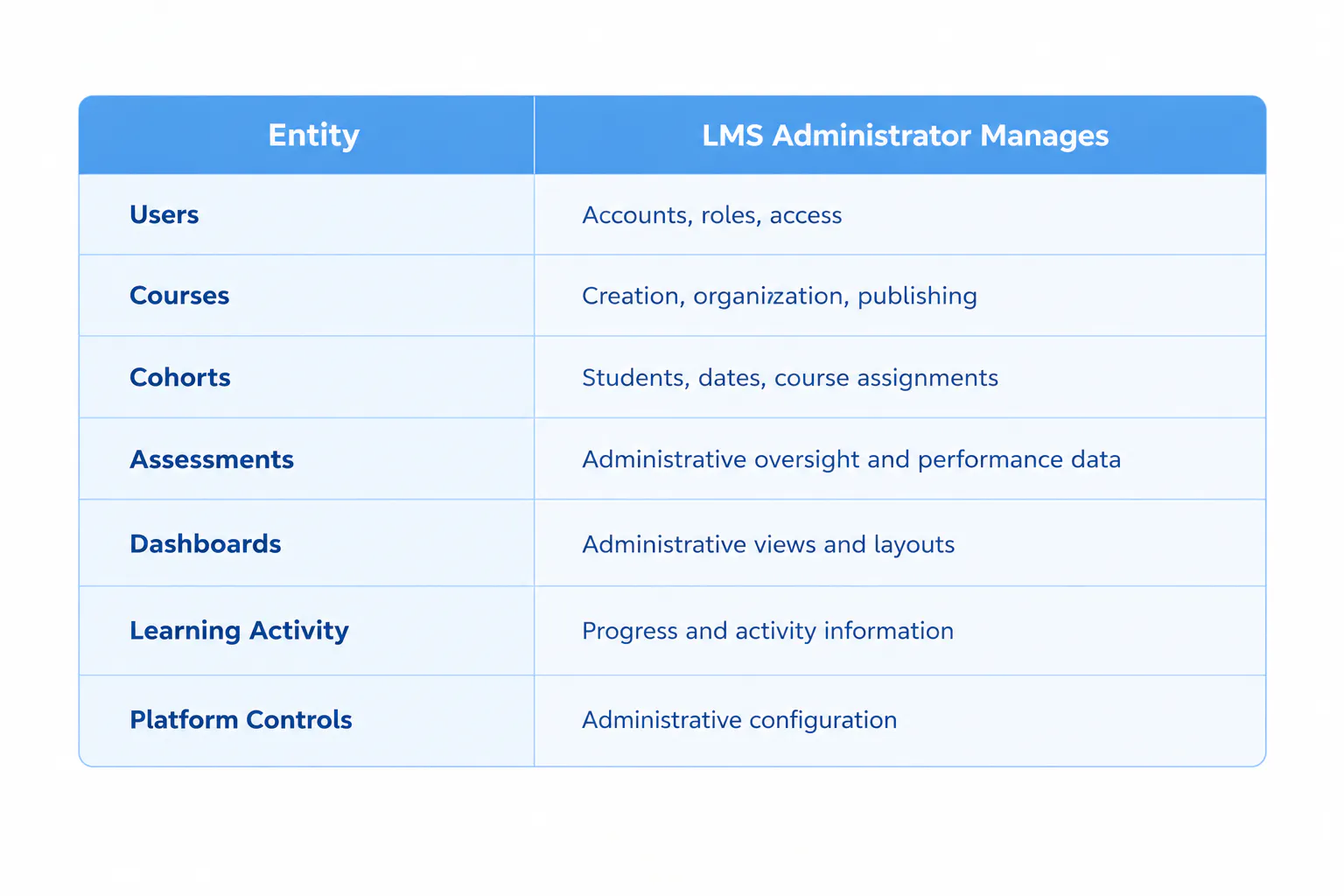
Manage Platform Settings and Administration
Platform configuration determines how the learning environment is organized and controlled.
Administrative work may include:
- Configuring platform settings
- Managing administrative dashboards and workspaces
- Maintaining platform-level controls
- Managing relevant access settings
- Ensuring users see information appropriate to their role
Monitor Learning Activity
The administrative role also involves reviewing information generated through learning activity.
Depending on the platform and assigned permissions, this can include:
- Reviewing learner progress
- Monitoring assessment-related information
- Identifying administrative issues affecting learning operations
- Reviewing available reporting and insight capabilities
The purpose is not to replace instructional judgment. Instead, the administrator maintains the platform structure that allows teachers and school leaders to access relevant learning information.
Read more: What Are LMS User Role?
How Is an LMS Administrator Different From an LMS Manager or Teacher?
The titles can overlap across organizations, but the scope of responsibility is generally different.
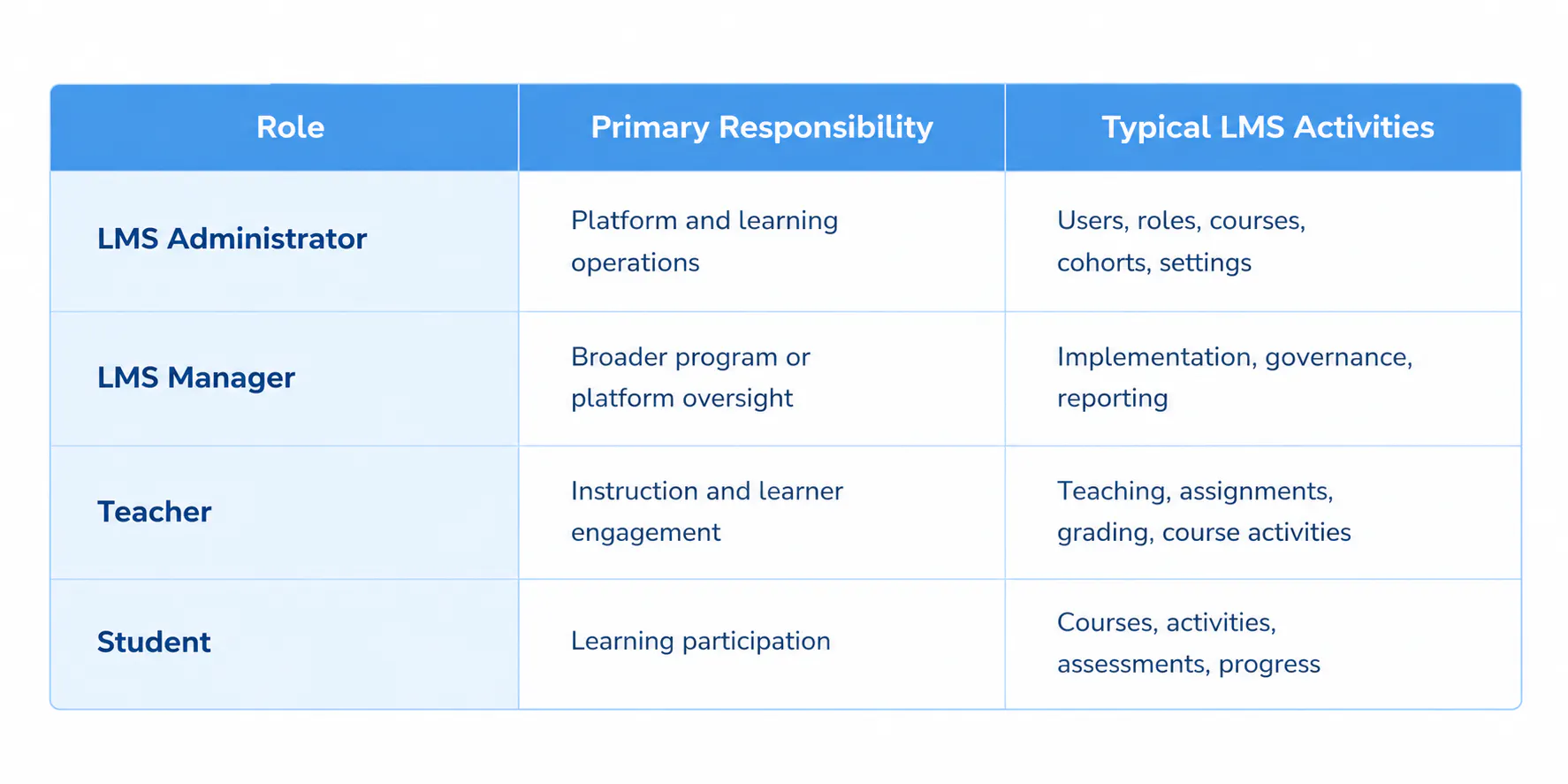
The distinction is primarily based on the entity and level of responsibility. An administrator works with the platform's operational structure, a manager may oversee the broader learning technology program, a teacher works with instruction, and a student participates in learning.
What Skills Does an LMS Administrator Need?
The role combines platform knowledge with organizational, communication, and data-handling skills.
LMS and Technical Skills
A learning platform administrator should understand:
- Platform configuration
- User and role management
- Course administration
- Data and reporting
Organizational Skills
Strong organization is important because the administrator may manage relationships between users, courses, cohorts, and permissions.
Useful capabilities include:
- User management
- Course organization
- Cohort coordination
- Process consistency
Communication Skills
The role involves working with people who have different responsibilities within the learning environment.
Communication skills help with:
- Supporting teachers
- Communicating with administrators
- Resolving user-access issues
- Explaining platform workflows
Data and Administrative Skills
The administrator may also work with information generated through platform activity.
Relevant skills include:
- Interpreting learning activity
- Monitoring assessment information
- Maintaining accurate records
- Understanding administrative reporting
Read more: How an LMS Strengthens Parent-Teacher Communication?
How Does an LMS Administrator Support the Learning Process?
The administrator supports the operational workflow around learning without replacing the teacher's instructional role.
The process can be understood as:
- Set Up: Users, roles, courses, cohorts, and access are configured within the platform.
- Assign: Learners are connected with the appropriate courses, cohorts, or learning spaces.
- Deliver: Teachers use the configured learning environment to provide instruction and learning activities.
- Monitor: Available learner progress and activity information can be reviewed by authorized users.
- Assess: Assessment-related information is maintained and made available according to user roles and permissions.
- Review: Teachers and school leaders can use relevant information to understand learning activity and performance.
The administrator supports the structure behind this process. The teacher remains responsible for teaching, while students participate in the learning activities provided through the platform.
Read more: How an LMS Simplifies School Management & Administration?
How Can Someone Become an LMS Administrator?
Becoming an LMS administrator starts with building a strong foundation in education, technology, and learning management systems. While there is no single required path for every LMS administrator role, the right education, technical knowledge, and hands-on experience can help you prepare for the position.
- Get the Right Education: A bachelor's degree in education, instructional technology, educational technology, information technology, or a related field can provide a useful foundation for working with learning platforms and educational workflows.
- Understand LMS Platforms: Learn how learning management systems work, including how they organize users, roles, courses, learning spaces, assessments, and learner activity.
- Build Administration Skills: Develop practical skills in managing user accounts, permissions, courses, enrollments, cohorts, and access settings within an LMS.
- Develop Data and Reporting Skills: Become comfortable working with learner progress, learning activity, assessment information, and administrative reports.
- Understand School Learning Workflows: Familiarize yourself with how teachers deliver instruction, how students participate in learning, and how school administrators oversee academic operations.
- Gain Hands-On Experience: Work directly with an LMS to understand how platform configuration affects users, courses, cohorts, and day-to-day learning operations. Practical experience can help you build the confidence needed to manage an LMS effectively.
Quyl Helps Administrators Manage School Learning Operations
Quyl gives administrators a central platform to manage the learning operations behind courses, users, cohorts, assessments, and learner progress. Administrators can organize cohorts, assign courses, monitor enrollment and learning activity, and access performance information across learner groups.
For schools, this means less fragmented administration and clearer visibility across the learning environment. With Quyl, administrators can keep courses and cohorts organized while using learning and assessment data to monitor performance and support better academic decisions.

