
Key Takeaways
- Cloud LMS platforms are provider-managed, giving schools easier access, automatic updates, scalable infrastructure, and less responsibility for server maintenance.
- Traditional or on-premises LMS platforms provide greater infrastructure control, but schools must manage hosting, security configurations, updates, backups, and technical administration.
- The right LMS depends on the school’s priorities — cloud LMS solutions suit institutions seeking flexibility and easier maintenance, while on-premises LMS solutions can suit schools that need greater control and have strong IT resources.

The main difference between a cloud LMS and a traditional LMS is how the platform is hosted and maintained. A cloud LMS runs on provider-managed cloud infrastructure, while a traditional LMS typically runs on servers managed by the institution.
A cloud LMS gives schools access to learning tools through internet-connected devices without requiring schools to maintain their own server infrastructure. A traditional LMS gives institutions greater control over their hosting environment but also places more responsibility for maintenance, updates, backups, and technical administration on the institution.
In this blog, we compare cloud LMS and traditional LMS, their key differences, benefits, limitations, infrastructure requirements, scalability, and suitability for modern schools.
What Is a Cloud LMS?
A cloud LMS is a Learning Management System that runs on cloud infrastructure managed by the LMS provider. The provider hosts the platform, stores learning data, manages system updates, and maintains the underlying infrastructure. Schools access the LMS through internet-connected devices without managing their own LMS servers.
Key features of a cloud LMS:
- Cloud Hosting – The provider hosts the LMS and its data on cloud infrastructure.
- Anywhere Access – Teachers and students access learning activities from supported devices with an internet connection.
- Automatic Updates – The provider delivers platform updates without requiring local installation.
- Scalable Infrastructure – Schools can support growing users and learning activities without adding local servers.
- Centralised Data – The platform stores courses, assignments, assessments, and learning records in one environment.
- Provider Managed Maintenance – The provider manages infrastructure maintenance, backups, and system availability.
Read more: Top 5 Types of Learning Management Systems
What Is a Traditional LMS?
A traditional LMS, or an on-premises LMS, is a Learning Management System that an institution typically hosts and manages on its own infrastructure. The institution manages servers, software installations, system updates, backups, security configurations, and ongoing technical maintenance.
Key features of an on-premises LMS:
- Institution Managed Hosting – The school hosts the LMS on its own servers or infrastructure.
- Infrastructure Control – The institution controls the server environment and system configuration.
- Custom Security Configuration – IT teams can apply institutional security policies to the LMS environment.
- Local Data Management – The institution manages where LMS data is stored and how the data is handled.
- Custom Maintenance – Internal IT teams manage updates, backups, troubleshooting, and system maintenance.
- Direct System Administration – The institution controls technical access, configurations, integrations, and user administration.
Read more: Open Source vs Cloud LMS: Key Differences Explained
Cloud LMS vs On Premise LMS: What Is the Difference?
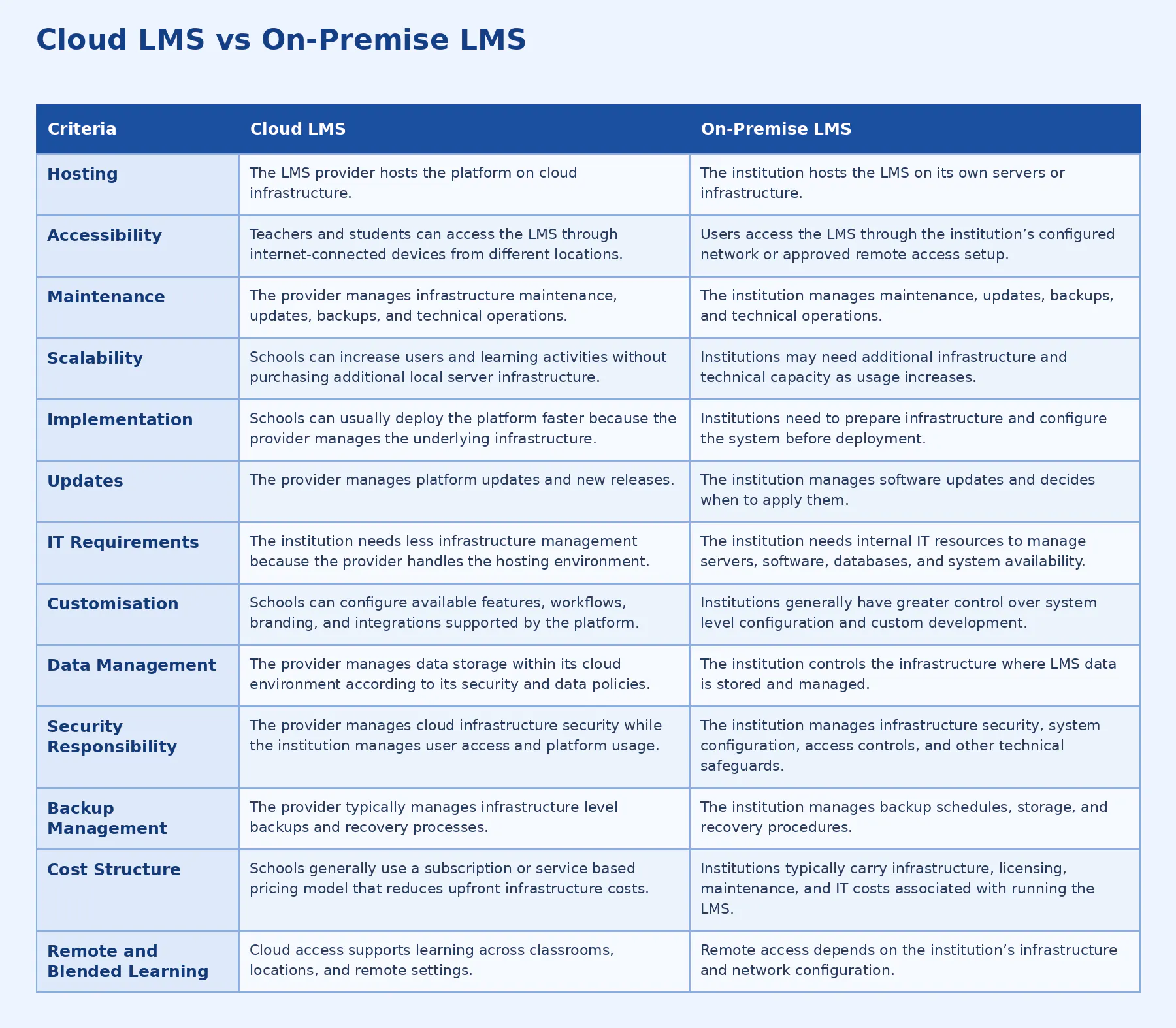
The main difference between a cloud LMS and an on-premises LMS is where the LMS infrastructure is hosted and who manages it. A cloud LMS uses provider-managed cloud infrastructure, while an on-premises LMS runs on infrastructure controlled and maintained by the institution. This difference affects accessibility, maintenance, scalability, customisation, security responsibilities, and implementation.
Which LMS Should Schools Choose?
Schools should choose a cloud LMS when they need faster deployment, easier maintenance, flexible access, and scalable learning without managing their own server infrastructure. An on-premises LMS can suit institutions that require greater control over infrastructure, data storage, and system configuration and have the IT resources to manage those requirements.
How Quyl Supports Cloud Based Learning?
Quyl helps schools deliver cloud based learning through one connected platform for teaching, assessment, administration, and student progress.
- Centralised Learning – Teachers can create courses, upload learning resources, and manage assignments and quizzes from one platform.
- Live Learning – Teachers can use Live Classes to deliver synchronous lessons alongside self paced digital learning.
- Flexible Learning – Students can access courses, resources, assignments, and assessments according to their learning schedules.
- Institution Administration – Schools can manage enrolments, schedules, payments, and academic activities through the LMS.
- Learning Insights – Teachers and administrators can use Smart Insights and reports to monitor student performance.
- Blended Learning – Quyl combines live instruction and self paced learning to support a connected blended learning model.
- Scalable Delivery – Schools can expand learning activities and user access without managing additional LMS infrastructure themselves.

