
Key Takeaways
- RBAC (Role-Based Access Control) assigns LMS permissions based on user roles, determining which information and features each user can access.
- Common LMS roles include administrators, teachers, students, and parents, with permissions tailored to their responsibilities.
- Schools can improve LMS security by following the principle of least privilege, reviewing permissions regularly, and restricting access to sensitive student data.

Role-based access control (RBAC) is a security method that assigns permissions to users based on their job or function within a learning management system. It allows administrators, teachers, students, and parents to access the tools and information relevant to their responsibilities while restricting access to sensitive student records.
RBAC can also help educational institutions support compliance with the Family Educational Rights and Privacy Act (FERPA), a U.S. federal law that protects the privacy of student education records. FERPA requires schools to limit school officials' access to education records to those with a legitimate educational interest.
In this blog, we explain role-based access control, how RBAC works in an LMS, the common user roles and permissions, and the best practices schools can follow to manage access and protect student data.
What Is Role-Based Access Control (RBAC)?
Role-based access control (RBAC) is a security method that assigns permissions to users based on their job or function rather than granting access individually to every user.
In a learning management system (LMS), roles determine which resources users can access and what actions they can perform. For example, a teacher can manage course materials and grade assignments, while a student can access lessons and submit coursework.
RBAC connects four key elements:
- Users: Individuals who access the LMS.
- Roles: Categories assigned according to responsibilities.
- Permissions: Actions users are allowed to perform.
- Resources: LMS features and information, such as courses, assessments, attendance records, and student data.
What Are the Common User Roles in an LMS?
The common role specific user roles in an LMS include administrators, teachers, students, and parents or guardians.
Each role has specific permissions based on its responsibilities, helping ensure users can access the learning resources and information they need without accessing restricted functions.
1. LMS Administrator
Manages the learning platform, including user accounts, role assignments, course settings, platform configuration, and reports. Administrators typically have broader permissions to oversee learning activities and system operations.
2. Teacher or Instructor
Creates and manages courses, uploads learning materials, schedules classes, assigns assessments, grades submissions, records attendance, and monitors student progress.
3. Student or Learner
Accesses assigned courses, views learning materials, attends classes, completes quizzes and assignments, submits coursework, and checks grades and learning progress.
4. Parent or Guardian
Views relevant information about their children, including attendance records, academic progress, assessment results, and other school updates permitted by the institution.
Note: The available roles and their permissions vary by LMS. Some platforms offer predefined roles, while others allow administrators to customise access according to institutional requirements.
How Does Role-Based Access Control Work in an LMS?
Role-based access control in an LMS works by assigning users predefined roles and linking each role to specific permissions. When users sign in, the system uses their assigned roles to determine which courses, learning resources, student records, and administrative functions they can access.
User Identification and Role Assignment
When a user joins an LMS, the administrator assigns a role based on their responsibilities, such as administrator, teacher, student, or parent. Each role determines the user's permitted activities within the platform.
Permissions and Access Rules
Each role has specific permissions that define what users can view, create, edit, or manage. For example, teachers may grade assignments and record attendance, while students can submit assignments and view their own results.
Access to Learning Resources and Data
The LMS checks the user's permissions before allowing access to relevant resources. A teacher may access assigned courses and student performance records, while a parent may view their child's progress without accessing other students' information.
Permission Updates and Role Changes
Administrators can update permissions when users change responsibilities. For example, when a teacher takes charge of another class, their course access can be updated to reflect the new assignment. When a staff member leaves the institution, their access can be revoked to prevent unauthorised use.
Read more: What Is an AI-Powered LMS Platform?
Why Is Role-Based Access Control Important in an LMS?
Role-based access control (RBAC) helps schools manage user permissions, protect sensitive student information, and ensure that administrators, teachers, students, and parents can access the information relevant to their responsibilities.
By assigning permissions according to predefined roles, an LMS can reduce unauthorised access and simplify administrative tasks.
- Protects sensitive information: Restricts access to student records, grades, attendance, and other confidential information based on user permissions.
- Reduces administrative errors: Prevents users from accidentally modifying records or settings outside their responsibilities.
- Improves operational efficiency: Allows administrators to manage permissions through roles instead of configuring access separately for every user.
- Supports accountability: Defines who can view, create, edit, or manage specific information and learning activities.
- Scales with institutional growth: Makes it easier to manage access as schools add users, courses, departments, and learning groups.
How to Implement Role-Based Access Control in an LMS
Implementing RBAC involves identifying user responsibilities, defining roles, assigning appropriate permissions, and reviewing access regularly. The following steps help institutions establish an effective access management process.
1. Identify User Roles
List the different types of users and their responsibilities within the institution. Common LMS roles include administrators, teachers, students, and parents, each requiring different levels of access.
2. Define Permissions for Each Role
Determine which actions each role needs to perform. For example, teachers may need to create assignments, grade submissions, and record attendance, while students need permission to access lessons and submit coursework.
3. Apply the Principle of Least Privilege
Give each role only the permissions required to fulfil its responsibilities. A teacher should have access to relevant courses and student records without automatically receiving platform-wide administrative permissions.
4. Configure Roles in the LMS
Use the platform's role management settings to assign permissions to each user category. Configure access to relevant features, including courses, assessments, attendance, reports, and student information.
5. Test Access Rules
Verify that each role can perform its permitted actions and cannot access restricted functions. For example, confirm that students cannot modify grades or view other students' private records.
6. Review and Update Permissions
Review access regularly and update permissions when users change responsibilities or leave the institution. Remove outdated access to prevent former staff members from retaining permissions they no longer need.
Important: RBAC is one part of a broader security strategy. Institutions should also implement appropriate authentication, secure data handling, access monitoring, and privacy policies to protect student information.
Read more: Best LMS with Payment Gateway Integration
What Is the Difference Between RBAC and Other Access Control Models?
Role-based access control (RBAC), attribute-based access control (ABAC), and discretionary access control (DAC) determine how users gain access to information and system resources. The main difference lies in how each model assigns permissions and makes access decisions.
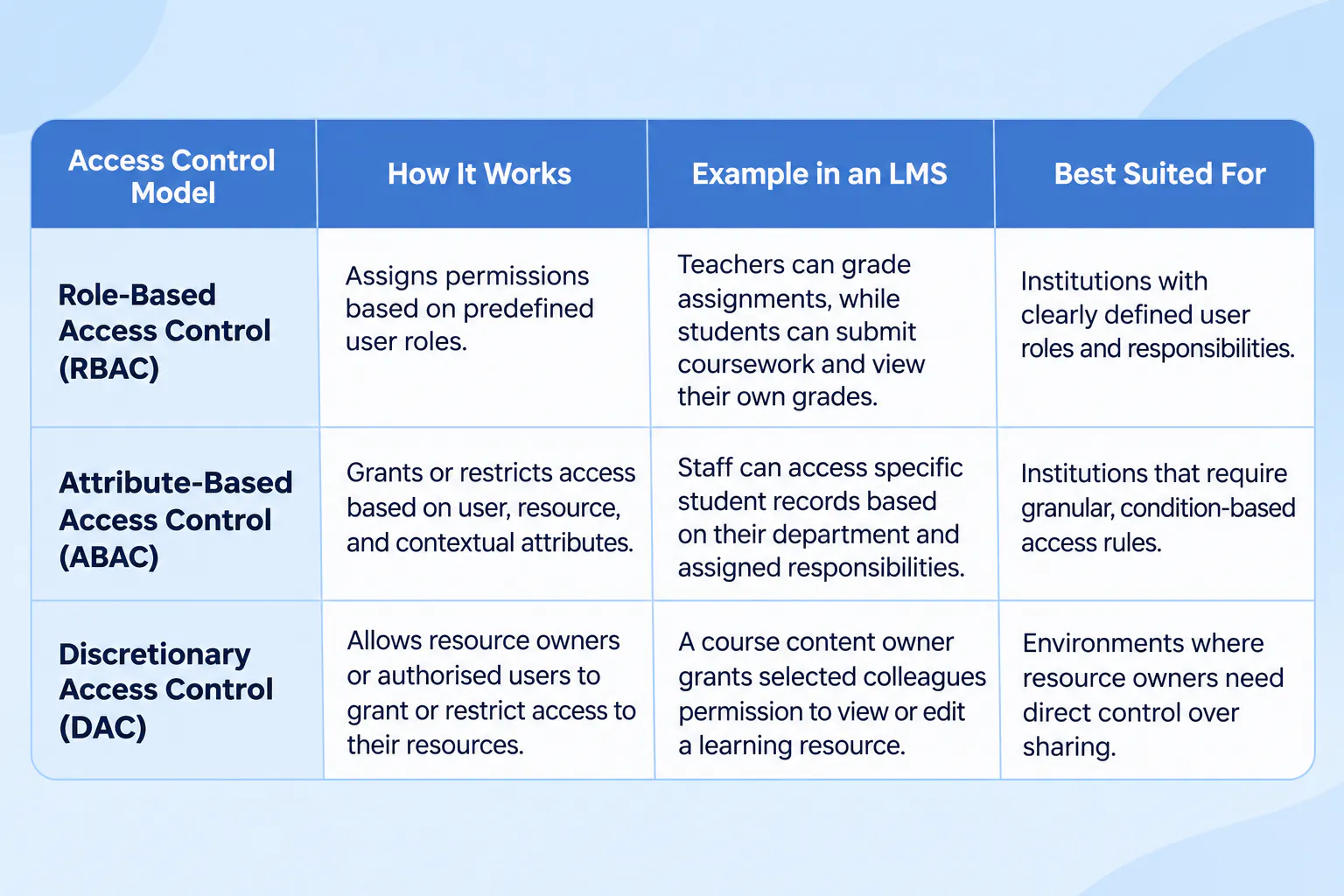
RBAC is generally suitable for managing access across standard LMS roles, while ABAC offers greater flexibility when permissions depend on multiple conditions. DAC is useful when individual resource owners need control over who can access or modify their content.
What Are the Best Practices for Managing LMS Roles and Permissions?
Effective LMS access management requires clearly defined roles, appropriate permission levels, and regular reviews. Schools should establish access rules that reflect staff responsibilities and protect student information without restricting legitimate teaching and learning activities.
Follow the Principle of Least Privilege
Give each user only the permissions required to perform their responsibilities. For example, a teacher may need access to their assigned classes and student grades but not to platform-wide settings or financial records.
Define Roles Clearly
Create roles around actual responsibilities, such as administrator, teacher, student, and parent. Define the actions each role can perform to avoid unnecessary permissions and overlapping responsibilities.
Review Permissions Regularly
Review user access when staff change positions, take on new classes, or leave the institution. Remove outdated permissions and deactivate accounts when access is no longer required.
Separate Sensitive Responsibilities
Avoid giving users unnecessary control over unrelated functions. For example, managing academic assessments does not automatically require permission to manage fee records or platform-wide user settings.
Test Role Permissions Before Deployment
Check what each role can view, create, edit, delete, and manage before introducing access changes. Testing helps identify excessive permissions and ensures users can complete their intended tasks.
Maintain Appropriate Access Records
Use available audit logs and access histories to review permission changes, investigate unexpected activity, and establish accountability for sensitive operations.
Read more: Signs It’s Time to Switch Your School LMS
What Should You Look for in an LMS With Role-Based Access Control?
When evaluating an LMS, schools should look for role and permission management features that support their operational requirements, protect student information, and remain manageable as the institution grows.
- Configurable roles and permissions: Allows administrators to assign access based on users' responsibilities.
- Separate user experiences: Provides relevant functions for administrators, teachers, students, and parents.
- Course and cohort access restrictions: Limits access to the courses, learning groups, and records relevant to each user.
- Flexible permission management: Accommodates different responsibilities across departments, programmes, and classes.
- Appropriate access to sensitive records: Helps restrict access to grades, attendance, assessments, and payment information.
- Scoped API access: Supports restricting integrations to specific resources or operations where the LMS provides this capability.
- Straightforward access maintenance: Makes assigning, updating, reviewing, and revoking permissions easier for administrators.
Before selecting a platform, verify how its roles and permissions work in practice. A list of predefined roles alone does not guarantee that access can be restricted at the level your institution requires.
Read more: Top 10 Features to Look for in an LMS
How Does Role-Based Access Control Work in Quyl?
Quyl supports distinct user roles for administrators, teachers, students, and parents, allowing each user type to access relevant learning and management functions. This role-based structure helps schools coordinate teaching activities, manage learner information, and provide parents with access to relevant student updates.
- Administrators manage users and oversee platform activities according to their permissions.
- Teachers manage course content, assignments, assessments, attendance, and student progress.
- Students access learning materials, complete assigned activities, submit coursework, and review their progress.
- Parents access relevant information about their children, including progress and attendance, within the permissions provided to them.
Quyl also supports scoped API keys that can be restricted to resources such as tenants, cohorts, courses, and bundles. This allows integrations to be configured around specific resource scopes rather than relying on unrestricted access.
Conclusion
Role-based access control helps schools manage LMS permissions, protect student information, and ensure users access only the features relevant to their responsibilities. By defining clear roles, applying least-privilege access, and reviewing permissions regularly, institutions can maintain better control over their learning platforms.
When selecting an LMS, look for flexible role management, clear permission settings, and secure access to student data. Quyl supports role-based access for administrators, teachers, students, and parents, helping institutions manage academic activities while providing users with access to relevant information.
Answering Your Questions
1. What is RBAC in a learning management system?
RBAC controls what users can view and do in an LMS based on their assigned roles, such as admin, teacher, or student.
2. What are the common user roles in an LMS?
The common roles are administrators, teachers, students, and parents or guardians. Each role has specific access and permissions.
3. How does RBAC improve LMS security?
RBAC ensures users access only the information and features needed for their roles, protecting student records, grades, and settings.
4. What is the difference between RBAC and ABAC?
RBAC grants access based on a user's role, while ABAC considers attributes such as department, location, and resource type.

