
Key Takeaways
- The five LMS platforms with calendar functionality are Moodle, Canvas LMS, Google Classroom, Blackboard Learn, and Quyl.
- LMS calendars help institutions manage class schedules, assignment deadlines, academic events, meetings, and recurring activities.
- Compare calendar views, event management, deadline tracking, sharing options, integrations, and pricing to find a platform that meets your institution's scheduling needs.

Learning Management Systems (LMS) with Calendar Functionality help educational institutions manage class schedules, academic events, assignment deadlines, assessments, and important dates in one place. A centralised calendar keeps administrators, teachers, and students informed about upcoming activities and makes academic scheduling easier to coordinate.
To help institutions compare their options, we reviewed five platforms: Moodle, Canvas LMS, Google Classroom, Blackboard Learn, and Quyl. Our comparison considers their calendar features, usability, and real-time user feedback to provide a clearer picture of how each platform supports scheduling and academic coordination.
In this blog, we'll compare these platforms, highlight their key calendar capabilities, and help you evaluate which LMS best fits your institution's scheduling requirements.
Best LMS Platforms With Calendar Functionality: Comparison
The five platforms offer different approaches to academic scheduling. Some automatically display assignment deadlines, while others provide dedicated tools for managing school events, recurring classes, and meetings.
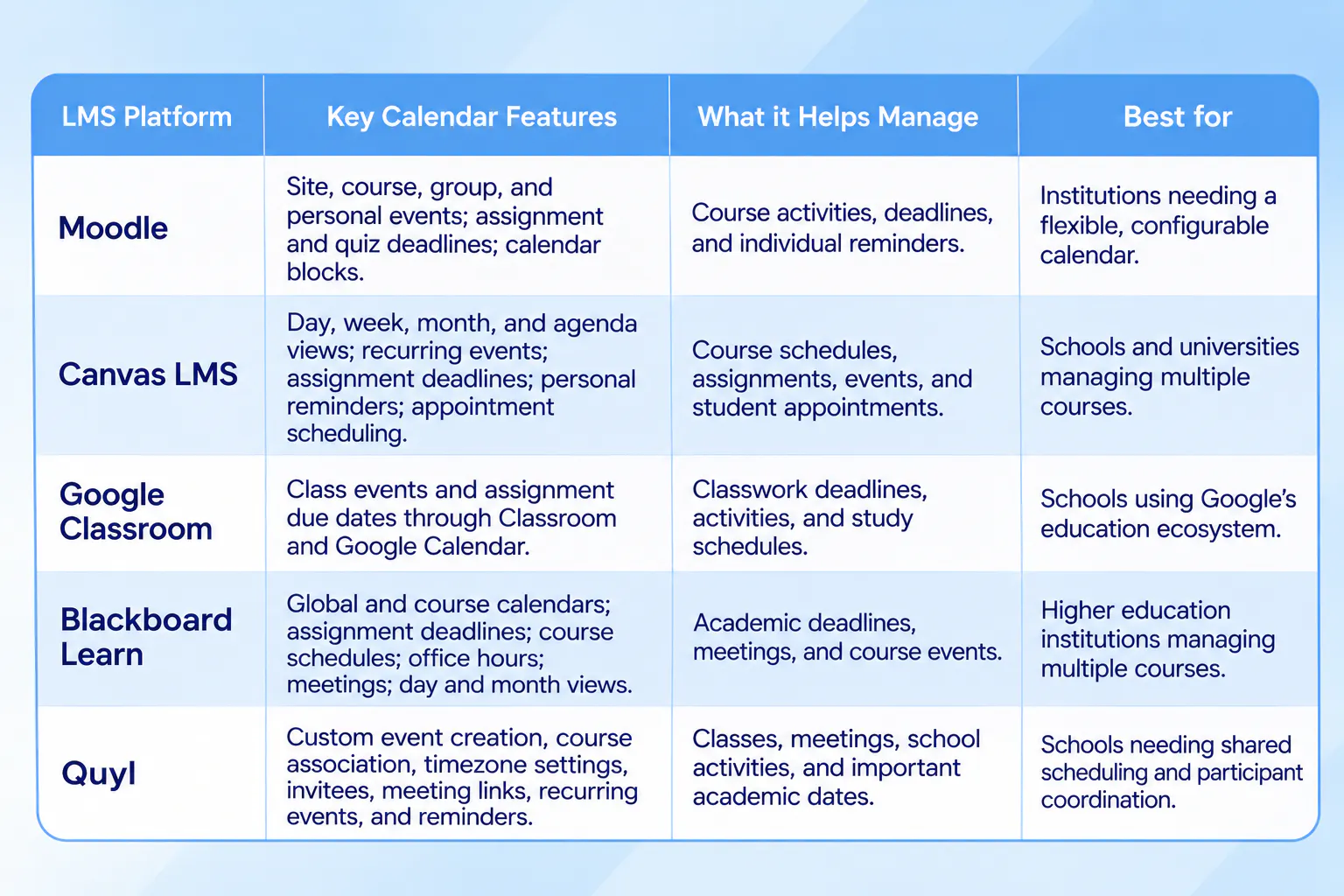
Review and research note: We reviewed official product documentation and publicly available platform information on 26 November 2026. Calendar features, available views, event management options, and integrations may vary by platform, subscription plan, or institutional configuration.
How We Evaluated These LMS Platforms for Calendar Functionality?
A calendar feature is useful only when it helps users organise schedules and keep track of important academic activities. We reviewed the official product documentation and feature information for each platform, along with publicly available user feedback, to understand how their calendars work in practice.
Our evaluation focused on five areas:
- Calendar Views and Navigation: We examined whether users can switch between daily, weekly, monthly, or agenda views and access upcoming activities easily.
- Event and Schedule Management: We considered the ability to create, edit, and manage class schedules, course events, meetings, and recurring activities.
- Assignment and Deadline Tracking: We checked whether assignment due dates, assessments, and other academic deadlines automatically appear in the calendar.
- User Access and Calendar Sharing: We looked at how calendars support teachers, students, administrators, and groups, including options to view or manage shared schedules.
- Usability and User Feedback: We considered publicly available user reviews to understand the overall ease of use, navigation, and scheduling experience, alongside the documented calendar capabilities.
The Short Answer: 5 LMS Platforms With Calendar Functionality
LMS platforms differ in how they manage class schedules, course events, assignment deadlines, and academic activities. Here are five platforms to consider based on their calendar capabilities and scheduling use cases.
- Moodle: Best for educational institutions that need a flexible calendar to manage site-wide, course, group, and individual events, along with assignment and quiz deadlines.
- Canvas LMS: Best for schools and universities that want a centralised calendar combining course assignments, events, personal reminders, and optional appointment scheduling.
- Google Classroom: Best for teachers and schools that need a simple way to view classwork deadlines and class events through Classroom and Google Calendar.
- Blackboard Learn: Best for higher education institutions that need a central calendar to track assignment deadlines, course schedules, meetings, and upcoming events across courses.
- Quyl: Best for schools and educational institutions that want to coordinate classes, meetings, school activities, and recurring events through a shared calendar with weekly and monthly views.
1. Moodle
Moodle provides a built-in Calendar that brings together site-wide, course, group, and personal events, along with assignment and quiz deadlines. Teachers and administrators can create events for different user groups, while students can track upcoming academic activities and deadlines through the calendar.
Key Features
- Multiple Event Types: Supports site, course, group, category, and personal events.
- Assignment and Quiz Deadlines: Automatically displays activity deadlines in the calendar.
- Event Creation: Allows users with the required permissions to add, edit, and delete events.
- Recurring Events: Supports repeating calendar events.
- Calendar Blocks: Displays calendar and upcoming event information within course pages or the site dashboard.
- Event Management: Allows manually created events and supported activity dates to be moved to different dates.
Best For
Educational institutions that need a flexible calendar to coordinate course schedules, group activities, academic deadlines, and institution-wide events.
Pricing
Moodle LMS is open-source software available for free download. However, institutions need to account for hosting, implementation, maintenance, and support costs. For a hosted option, MoodleCloud offers annual plans starting at €150 per year for up to 50 users. Pricing increases with user capacity and storage requirements.
Read more: 8 Best Alternatives to Moodle
2. Canvas LMS
Canvas LMS provides a centralised Calendar that combines course assignments, events, personal reminders, and group activities. Instructors and students can view schedules across multiple courses, create recurring events, and use the optional Scheduler to organise appointments and office hours.
Key Features
- Multiple Calendar Views: Supports day, week, month, and agenda views.
- Course and Assignment Integration: Automatically displays assignment deadlines and synchronises date changes with other Canvas features.
- Event Creation: Allows instructors to create course events and students to add personal events.
- Recurring Events: Supports repeating events for courses, groups, and personal calendars.
- Appointment Scheduling: The optional Scheduler allows students to book available appointment slots.
- Calendar Sharing: Provides calendar feeds for exporting schedules to external calendar applications.
Best For
Schools, colleges, and universities that manage multiple courses and need centralised scheduling, assignment tracking, and student appointment coordination.
Pricing
Canvas LMS offers institutional pricing through customised quotes based on the institution's requirements and selected plan. Canvas is available in Core, Plus, and Next tiers. A free Canvas account is also available for individual teachers, but it is not equivalent to the institution-level offering.
Read more: 8 Best Canvas LMS Alternatives
3. Google Classroom
Google Classroom connects class schedules and assignment deadlines with Google Calendar. Teachers and students can view classwork due dates and class events, while Google Calendar provides additional options for personal reminders and scheduling activities outside the Classroom calendar.
Key Features
- Class Calendar: Provides a shared calendar for each class.
- Assignment Deadlines: Automatically displays classwork due dates on the calendar.
- Class Events: Allows users to view scheduled class events.
- Google Calendar Integration: Displays classwork deadlines and events through Google Calendar.
- Personal Reminders: Teachers and students can add personal reminders and events in Google Calendar.
- Classwork Access: Allows users to open associated assignments directly from the Classroom calendar.
Best For
Schools and teachers already using Google Workspace for Education who need a simple way to coordinate class schedules, assignment deadlines, and academic activities.
Pricing
Google Classroom is included in Google Workspace for Education Fundamentals, which eligible educational institutions can access at no cost. Paid upgrades are available through Google Workspace for Education.
Education Plus has a suggested price of $6 USD per user per year, while the Teaching and Learning add-on costs $60 USD per user per year. Actual pricing and availability may vary by region and licensing arrangement.
Read more: 4 Alternatives to Google Classroom for Schools
4. Blackboard Learn
Blackboard Learn provides a Calendar that brings together assignment deadlines, course schedules, office hours, meetings, and instructor-created events. Users can access a global calendar to view activities across their courses or open an individual course calendar to see course-specific events.
Key Features
- Global Calendar: Combines upcoming events and deadlines across multiple courses.
- Course Calendar: Displays events and scheduled activities for an individual course.
- Automatic Due Dates: Adds assignment deadlines to the calendar automatically.
- Event Management: Allows instructors to create and manage course events, such as office hours and scheduled activities.
- Calendar Views: Supports day and month views, along with a dedicated Due Dates view.
- Calendar Settings: Allows users to select which calendars they want to display.
Best For
Colleges and universities that need a centralised calendar to manage course schedules, instructor appointments, academic events, and assignment deadlines.
Pricing
Blackboard Learn follows a custom institutional pricing model. Anthology does not publicly list standard subscription prices. Costs depend on institutional requirements, deployment, user numbers, selected capabilities, and implementation needs. Institutions must contact the vendor for a customised quote.
5. Quyl
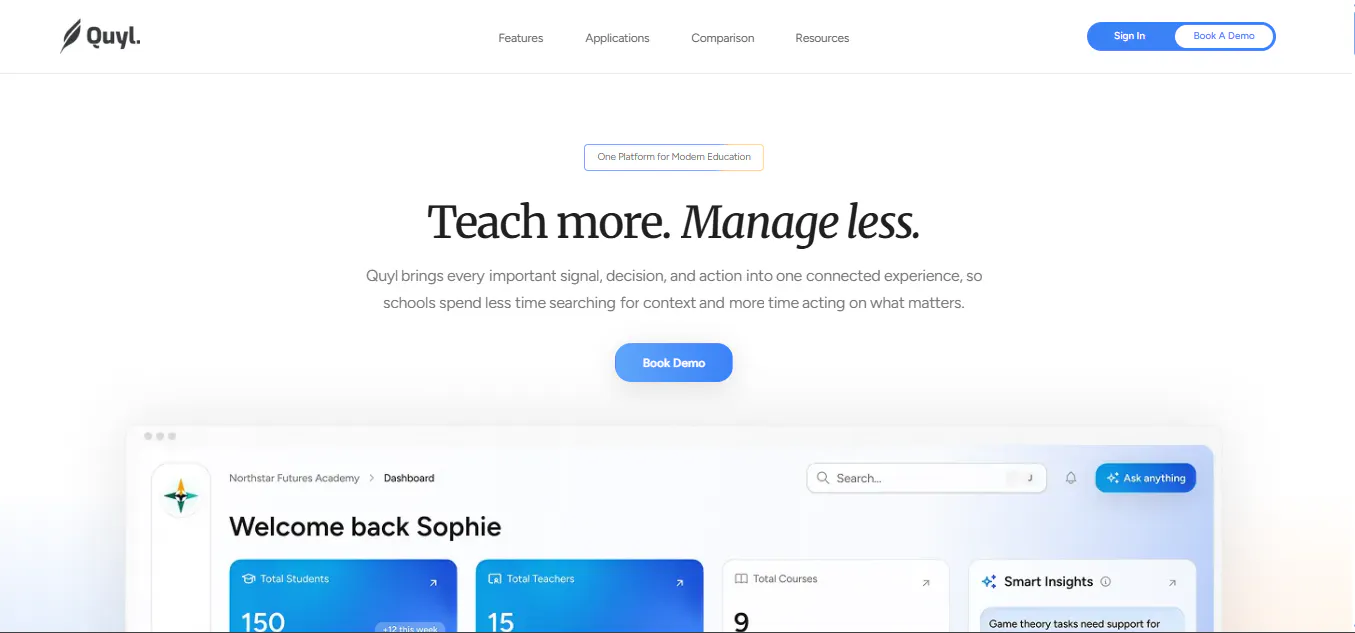
Quyl provides a shared Calendar for managing classes, meetings, school activities, and important academic dates. Users can create one-time or recurring events, associate them with courses, invite participants, add meeting links, and send reminders. Weekly and monthly views help users track upcoming activities across the school.
Key Features
- Event Creation: Add event names, descriptions, dates, start times, and durations.
- Course Association: Link calendar events to specific courses.
- Timezone Settings: Set the appropriate timezone for scheduled events.
- Invitee Management: Add participants to scheduled events.
- Meeting Links: Include meeting links in event details.
- Recurring Events: Create events that repeat.
- Event Reminders: Send reminders about scheduled activities.
- Calendar Views: Switch between weekly and monthly views.
Best For
Schools and educational institutions that need a shared calendar for coordinating classes, meetings, recurring activities, and school events while keeping participants informed.
Pricing
Quyl does not currently publish fixed subscription prices on its website. Institutions can contact the Quyl team to request a demo and discuss pricing based on their requirements, user base, and platform configuration.
Which LMS With Calendar Functionality Fits Your Needs?
The right LMS depends on how your institution manages academic schedules, assignment deadlines, meetings, and school activities. Here are three options to consider based on your requirements:
- Moodle: Suitable for institutions that need flexible scheduling across courses, groups, and the wider institution, along with assignment and quiz deadlines.
- Canvas LMS: A good option for schools and universities that need centralised course calendars, assignment tracking, recurring events, and appointment scheduling.
- Quyl: Worth considering for schools that need event creation, course association, invitee management, meeting links, recurring events, and reminders in one calendar.
Before making a decision, compare calendar usability, integration options, pricing, and the wider academic management features offered by each LMS.
Conclusion
An LMS calendar does more than display upcoming dates. It helps schools coordinate classes, track academic deadlines, organise meetings, and keep teachers and students informed about important activities.
Moodle, Canvas LMS, Google Classroom, and Blackboard Learn connect calendars with course activities and academic schedules in different ways. Quyl adds event creation, participant coordination, meeting links, recurring events, and reminders to its calendar functionality.
The right choice comes down to your institution's scheduling needs, existing workflows, and budget. Evaluate these capabilities alongside the platform's broader LMS features to find a solution that supports your academic operations.

