
Key Takeaways
- LMS implementation requires structured planning, including defining requirements, preparing content, configuring the platform, and setting up users and permissions.
- Testing, training, and a soft launch help prepare users before the final rollout, reducing access, configuration, and adoption issues.
- Implementation continues after launch through monitoring, user support, workflow improvements, and ongoing refinement of the learning environment.

LMS implementation is the process of introducing, configuring, and launching a learning management system (LMS) within an institution. It involves defining requirements, preparing learning content, configuring the learning platform, setting up users and permissions, testing workflows, training users, and monitoring the learning environment after launch.
A successful implementation requires more than choosing an LMS. Institutions need a structured plan to ensure the learning management platform supports their learning workflows, users can access the right content and features, and the digital learning environment is ready for ongoing use.
In this blog, we cover how to implement an LMS, the role of an LMS implementation consultant, the implementation process and timeline, a practical LMS implementation checklist, common challenges, post-implementation practices, and the difference between LMS implementation and LMS migration.
What Is LMS Implementation?
LMS implementation is the process of introducing, configuring, and launching a learning management system within an institution so users can access courses, learning content, assessments, and other required learning workflows.
It typically includes defining requirements, preparing content, configuring the learning platform, setting up users and permissions, testing the system, training users, launching the platform, and monitoring its use after launch.
The scope can vary depending on the organization, number of users, amount of content, existing systems, integrations, and implementation requirements. These factors determine how the digital learning platform needs to be configured and how users will interact with the learning environment.
What Is the Role of an LMS Implementation Consultant?
An LMS implementation consultant helps an organization plan, configure, test, launch, and improve an LMS according to its operational and learning requirements.
An implementation consultant may work with administrators, instructors, IT teams, managers, and the LMS provider throughout the project. Their role is to connect organizational requirements with the configuration and operation of the learning management platform.
Typical responsibilities can include:
- Assessing implementation requirements
- Defining the implementation scope
- Creating the implementation plan
- Mapping existing workflows
- Supporting platform configuration
- Coordinating content preparation
- Supporting user and role setup
- Managing testing
- Coordinating training
- Supporting the launch
- Identifying post-launch issues
The consultant's role varies according to the size and complexity of the implementation. Smaller projects may be managed internally or directly with support from the learning platform provider.
Read more: What Is an LMS Administrator?
How To Implement an LMS?
A typical LMS implementation involves defining requirements, preparing content, configuring the platform, setting up users, organizing learning, testing workflows, training users, conducting a soft launch, completing the final rollout, and monitoring the system after launch.
The process connects the learning management system with the organization's content, users, learning activities, administrative processes, and day-to-day learning delivery.
1. Define Implementation Goals and Requirements
Estimated timeline: 1–2 weeks
Start by identifying what the organization needs the platform to accomplish.
The implementation team should document the learning, assessment, administration, and reporting workflows that the learning platform needs to support.
Requirements may include:
- Course and content management
- User and role management
- Assignments and assessments
- Progress tracking
- Learning groups or cohorts
- Instructor workflows
- Learner access
- Administrative processes
- Reporting requirements
- Integrations with existing systems
Defining these requirements creates a clear implementation scope and provides criteria for configuring and evaluating the learning management system.
It also establishes the relationship between organizational requirements, platform capabilities, user roles, learning activities, and expected outcomes before configuration begins.
2. Prepare Courses and Learning Content
Estimated timeline: 2–6 weeks
Review the learning content that will be delivered through the learning platform.
Existing content may need to be organized, updated, reformatted, or created before it is added to the digital learning environment.
This stage can include:
- Course materials
- Videos
- Documents and files
- Learning activities
- Assignments
- Assessments
- Course descriptions
- Supporting resources
Content preparation can take considerably longer when an organization has a large course library or content distributed across multiple systems.
The objective is to ensure that learning resources are structured appropriately for the course delivery environment, rather than simply transferring existing files into the new platform.
3. Configure the Learning Platform
Estimated timeline: 1–2 weeks
Configure the learning platform according to the requirements defined during planning.
Configuration can include organizational settings, user roles, course categories, learning structures, branding, and other platform-level settings supported by the selected system.
The configuration should reflect actual operational workflows rather than simply enabling every available feature.
4. Set Up Users, Roles, and Learning Groups
Estimated timeline: 1–2 weeks
Create or import users and assign the appropriate roles and access levels.
Common user types include:
- Administrators
- Instructors
- Learners
- Managers
- Other organization-specific users
If the platform supports cohorts or learning groups, users can also be organized according to how learning is delivered.
Before launch, verify that users can access the courses, activities, and functions relevant to their roles.
Read more: 10 LMS Red Flags to Look Out for When Choosing a Learning Platform
5. Organize Courses and Learning Activities
Estimated timeline: 1–3 weeks
Structure courses and learning activities within the platform.
A consistent course structure makes it easier for learners and instructors to find relevant content and complete required activities.
Depending on the system, this stage may involve:
- Organizing course content
- Assigning courses to learners or groups
- Setting up assignments
- Configuring assessments
- Organizing learning activities
- Defining course access
- Setting learning schedules
6. Test the Learning Platform
Estimated timeline: 1–2 weeks
Test the platform before making it available to the full user base.
Use test accounts for different user roles and run through the workflows users will perform regularly.
Testing can cover:
- User access
- Role permissions
- Course access
- Content availability
- Assignments
- Assessments
- Grading
- Progress tracking
- Learning group access
- Notifications and scheduled activities
Testing should identify configuration problems before they affect real users.
The implementation team should test the learning environment from the perspective of different user groups, not only confirm that the platform itself is technically operational.
Read more: 7 Key LMS Metrics to Track Learning Performance
7. Train Administrators, Instructors, and Users
Estimated timeline: 1–2 weeks
Training should focus on the tasks users need to perform on the platform.
Administrators may need training on user management, courses, settings, and administrative workflows.
Instructors may need training on course management, learning activities, assignments, assessments, grading, and progress monitoring.
Learners should understand how to access their courses, complete activities, submit required work, and review relevant learning information.
Training can be delivered through practical sessions, documentation, demonstrations, or a combination of these approaches.
The training process connects the configured learning technology platform with the people responsible for managing, delivering, and participating in learning.
8. Conduct a Soft Launch
Estimated timeline: 1–2 weeks
A soft launch introduces the platform to a limited group of users before the final rollout.
Select a representative group of administrators, instructors, and learners and have them complete common workflows.
Use this stage to:
- Identify usability issues
- Verify user access
- Test learning workflows with real users
- Collect feedback
- Identify training gaps
- Resolve configuration issues
- Confirm support processes
The feedback from the soft launch can then be used to make final adjustments before the wider rollout.
9. Complete the Final Rollout
Estimated timeline: Around 1 week
Once the soft launch issues have been addressed, roll out the learning platform to the full user base.
Depending on the organization, the final rollout can be:
- Full-scale across all users
- Phased by department or user group
- Staggered over several launch dates
Before the final rollout, confirm that users, courses, content, permissions, training, and support processes are ready.
The final rollout moves the learning management platform from controlled implementation into regular organizational use.
10. Monitor and Refine the Implementation
Estimated timeline: Ongoing after launch
Implementation does not end when the system goes live.
Monitor how users interact with the platform and identify areas that need adjustment.
This can include reviewing:
- Course activity
- Assignment completion
- Assessment performance
- Learning progress
- User feedback
- Access issues
- Administrative workflows
Post-launch information can help the organization improve course structures, training, user processes, and ongoing platform usage.
Monitoring also shows whether the digital learning platform is supporting the workflows and learning outcomes defined during the implementation stage.
Read more: LMS vs TMS: A Practical Comparison for Smarter Training Decisions
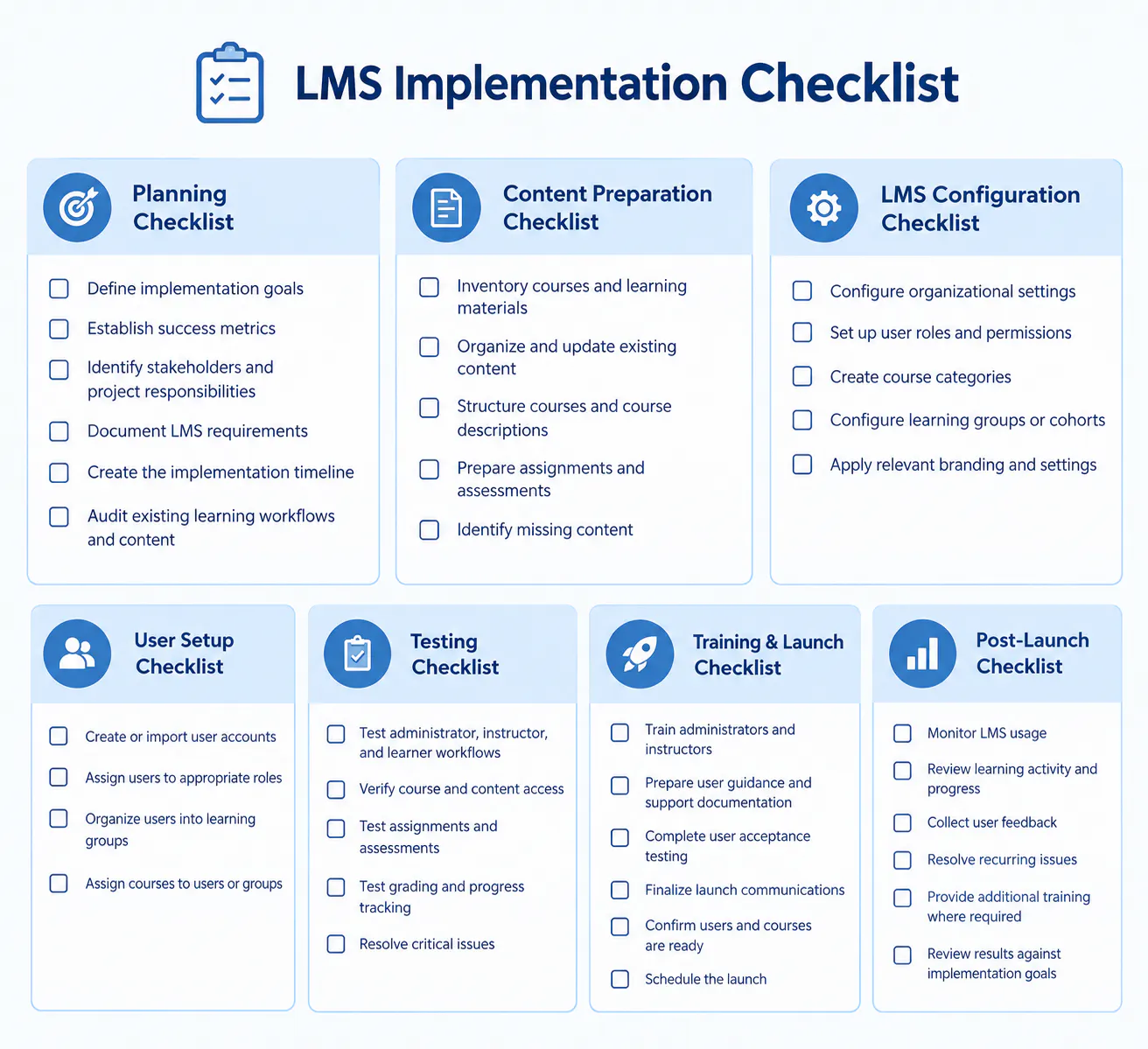
LMS Implementation Checklist (Step-by-Step)
Use this implementation checklist to keep the project organized from initial planning through post-launch review.
What Are the Common LMS Implementation Challenges?
Common LMS implementation challenges include unclear requirements, unprepared content, incorrect user access, insufficient testing, limited training, low adoption, and inadequate post-launch support.
Unclear Requirements
Without clearly defined requirements, implementation teams may configure the platform around features rather than actual organizational workflows.
A clear requirements process connects the learning objectives, user groups, course structure, administrative processes, and platform capabilities before implementation begins.
Poorly Prepared Content
Incomplete, outdated, or inconsistently structured content can delay implementation and create problems after launch.
Learning content needs to be reviewed in the context of the digital learning environment so that courses, activities, assignments, assessments, and supporting resources are ready for delivery.
Incorrect User Access
Incorrect roles or permissions can prevent users from accessing the courses and functions they need.
User setup should therefore connect roles and permissions with actual responsibilities and learning access requirements.
Insufficient Testing
Launching without testing real user workflows can result in access problems, course issues, or assessment errors.
Testing should cover the complete learning workflow across administrators, instructors, and learners so that the learning platform is validated from multiple user perspectives.
Limited User Training
Users need to understand the tasks they are expected to perform within the learning platform.
Without adequate training, adoption can remain low even when the system is technically ready.
Practical training helps users connect the platform's functions with their existing learning, teaching, training, and administrative responsibilities.
Low User Adoption
Users may continue relying on existing tools or processes instead of using the platform consistently.
Clear workflows, practical training, communication, and ongoing support can help address this issue.
Adoption depends not only on the technology but also on how effectively the learning platform becomes part of regular organizational workflows.
Lack of Post-Launch Support
Questions and configuration issues often emerge after users begin working with the platform.
A defined support process helps address these issues and identify recurring problems.
Post-launch support also provides information about how the digital learning environment is being used in practice, which can inform later configuration, training, and content improvements.
Read more: 9 Common LMS Mistakes to Avoid for Better Training Results
What Should Institutions Do After LMS Implementation for Long-Term Success?
Institutions should continue monitoring platform usage, reviewing learning activity, supporting users, and refining workflows after launch.
Post-implementation activities can include:
- Reviewing course activity
- Monitoring assignment completion
- Reviewing assessment performance
- Tracking learner progress
- Collecting instructor and learner feedback
- Identifying recurring support issues
- Updating learning content
- Improving internal platform processes
- Providing additional training
- Reviewing whether the learning management system still meets organizational requirements
Organizations should also distinguish between technical problems and adoption problems. A learning platform can function correctly while users still need clearer processes, better training, or additional support.
Long-term success depends on integrating the platform into regular learning and administrative workflows rather than treating implementation as a one-time technology project.
What Is the Difference Between LMS Implementation and LMS Migration?
LMS implementation is the process of introducing and configuring an LMS, while LMS migration involves moving existing users, courses, content, or learning data from one system to another.
The two processes can overlap, but their primary objectives are different.
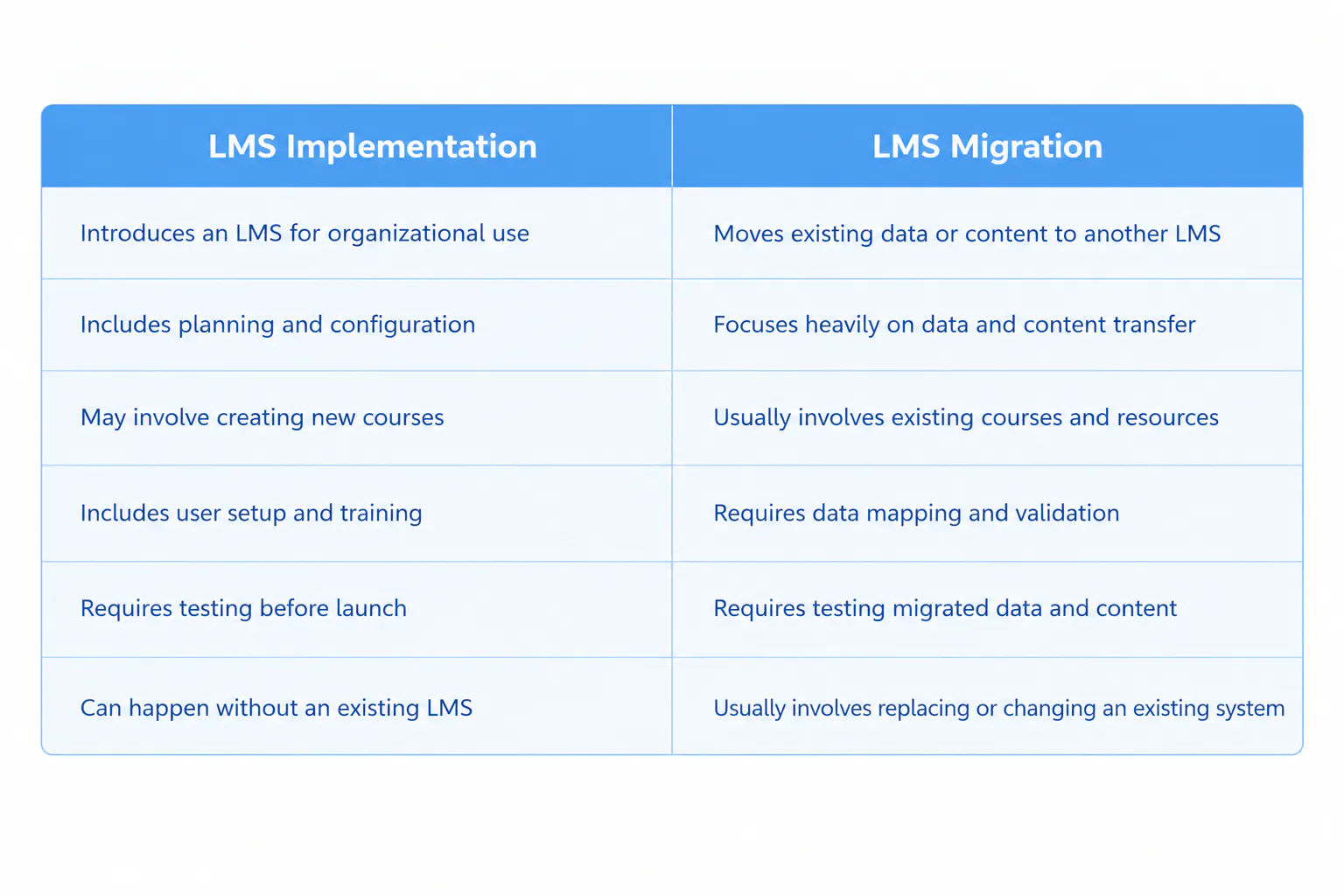
For example, an organization adopting an LMS for the first time is undertaking an LMS implementation.
An organization replacing an existing LMS and moving its users and learning content to a new platform is undertaking LMS migration as part of the broader learning platform implementation project.
Migration therefore focuses primarily on moving existing learning assets and data, while implementation establishes how the new learning management system will operate within the organization.
Conclusion
Successful LMS implementation requires structured planning, organized content, appropriate configuration, user setup, testing, training, and continuous post-launch improvement.
The implementation timeline can range from several weeks to several months depending on the size and requirements of the project. Defining requirements early, preparing content before launch, testing real workflows, and providing user support can reduce avoidable implementation problems.
LMS implementation should therefore be treated as an ongoing operational process rather than simply a software launch. The goal is to establish an LMS and digital learning environment that fit the organization's learning workflows, user requirements, content structure, and administrative processes and continue to support users after implementation is complete.

