
TL;DR
- A Learning Management System (LMS) is a digital learning platform used to create, deliver, and track online education and training programs across organizations and institutions.
- It supports features like course creation, learner tracking, assessments, and reporting to improve engagement and outcomes.
- Widely used across corporate and academic sectors, LMS platforms simplify training, ensure scalability, and enable data-driven learning.

A Learning Management System (LMS) is a software used to create, deliver, manage, and track education and training. Schools, universities, businesses, and other organizations use LMS platforms to organize learning content, assign courses, assess learners, and measure learning progress from one system.
The worldwide LMS software market was valued at $24.05 billion in 2024 and is projected to surpass $70 billion by 2030, showing a strong 19% annual growth rate. Globally, the education sector accounts for 21% of total LMS usage, following corporate and technology sectors.
The growing use of online learning makes an LMS important for organizations that need structured, scalable, and measurable training. The LMS platform connects learning content, learners, instructors, assessments, and learning data within one environment.
In this guide, you’ll learn what a learning management software is, how it works, its key features, common types, major use cases, benefits, limitations, and how to choose the right platform.
What is a Learning Management System (LMS)?
A learning management system (LMS) is software that manages the complete learning process, from course creation and content delivery to assessment and progress tracking.
Administrators use an LMS platforms to create courses, organize users, assign learning, manage permissions, and monitor training activity. Instructors use the platform to deliver lessons, assess learners, provide feedback, and review performance. Learners use the system to access courses, complete learning activities, take assessments, and track their own progress.
An LMS software therefore connects learning content with learner activity and measurable outcomes. Course materials provide information, learning activities reinforce understanding, assessments measure knowledge, and reporting converts learner activity into useful training data.
What Is an LMS in Education?
An LMS (Learning Management System) in education is a digital platform used to manage courses, learning content, assessments, student progress, and teaching activities in one place. An LMS for schools helps teachers and administrators organise learning while giving students a central platform to access courses and complete learning activities.
An LMS for schools can support course creation, assignments, assessments, grading, live classes, attendance, and student progress tracking. It provides a structured digital environment for teachers, students, administrators, and parents.
What Is the Full Form Of LMS?
LMS stands for Learning Management System. It is a software used to create, manage, deliver, and track learning and training programs. Organizations use an LMS for employee onboarding, compliance training, skill development, online education, and continuous learning.
What Are the Benefits Of Using An LMS?
An LMS benefits administrators and learners by making education and training easier to manage, access, personalize, and measure across academic and corporate environments.
- Reduced training costs: Digital learning reduces expenses for travel, venues, printed materials, and repeated instructor-led sessions.
- Real-time tracking: Administrators can monitor course completion, learner activity, assessment results, and performance.
- Faster learning: Learners can access training materials immediately and complete courses at a suitable pace.
- Personalized learning: Learning paths can match individual roles, skill levels, learning needs, and goals.
- Scalable training: Administrators can deliver courses to large numbers of learners without increasing physical training resources.
- Improved engagement: Videos, quizzes, simulations, microlearning, and interactive activities create more engaging learning experiences.
- Continuous learning: Learners can access ongoing courses for upskilling, reskilling, compliance, and professional development.
- Data-driven improvement: Learning data helps administrators identify knowledge gaps, evaluate training effectiveness, and improve learning programs.
What Are the Types Of Learning Management Systems?
The types of Learning management systems differ according to their hosting model, software model, purpose, and content compatibility. The right type depends on an organization's users, technical requirements, budget, and learning objectives.
By Hosting Model
- Cloud-Based LMS (SaaS): Hosted by the LMS provider and accessed through the internet. The provider generally manages infrastructure, updates, backups, and maintenance, making SaaS platforms suitable for organizations that want faster deployment and lower internal IT requirements.
- Self-Hosted (On-Premise) LMS: Installed on an organization's own infrastructure. The organization controls hosting, customization, data management, and maintenance but also assumes greater responsibility for technical resources and system administration.
- Third-Party Hosted LMS: Hosted and maintained by an external service provider on behalf of the organization. The model provides external infrastructure management while allowing greater control than many standard SaaS arrangements.
- Desktop And Mobile LMS: Desktop learning applications support local access, while mobile-focused platforms optimize courses and learning activities for smartphones and tablets. Mobile access is particularly useful for remote, field-based, and hybrid learners.
By Software Model
- Open-Source LMS: Provides access to the underlying source code, allowing organizations to modify and extend the platform. Open-source systems can provide significant customization but often require technical expertise for hosting, development, maintenance, and updates.
- Commercial LMS: Provided through paid subscriptions, licenses, or other commercial pricing models. Commercial platforms typically include vendor support, product updates, security maintenance, and ready-to-use functionality.
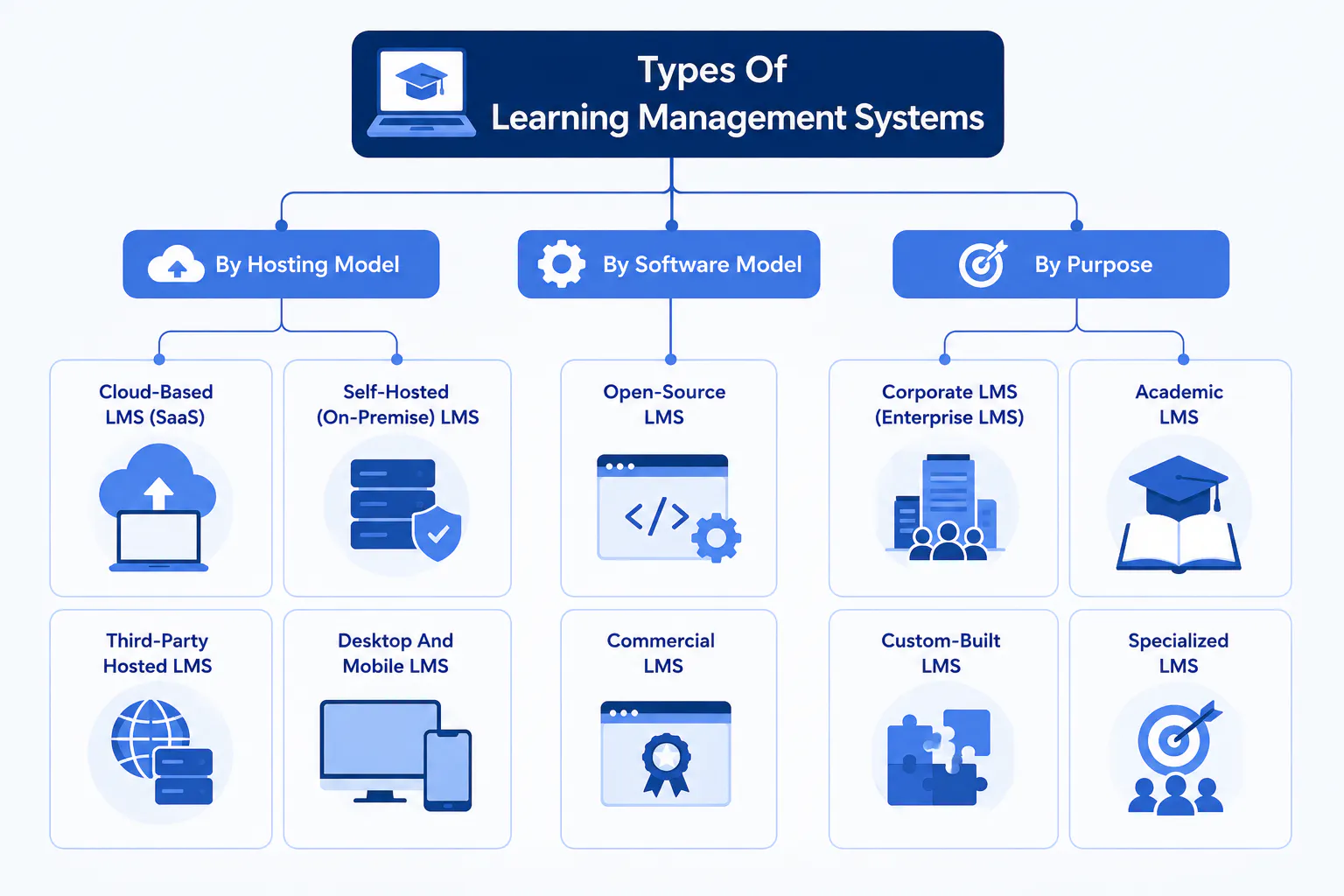
By Purpose
- Corporate LMS (Enterprise LMS): Built for employee training, onboarding, compliance, professional development, and workforce skills, a corporate LMS commonly includes reporting, certification management, integrations, and role-based learning.
- Academic LMS: Designed for schools, colleges, and universities, an LMS for schools supports course delivery, assignments, assessments, grading, student communication, and instructor feedback.
- Custom-Built LMS: Developed specifically for an organization's requirements. Custom systems provide greater control over functionality and workflows but generally require more development and maintenance resources.
- Specialized LMS: Designed for specific learning requirements such as blended learning, customer education, franchise training, extended enterprise learning, or mobile-first training.
How Does An LMS Work?
A learning management software manages learning through a simple process that connects course creation, content delivery, learner management, assessments, and progress tracking.
- Create courses: Administrators or instructors create courses and organize lessons, learning materials, quizzes, and other activities.
- Upload learning content: Training teams add videos, documents, presentations, and other educational resources to the relevant courses.
- Manage learners: Administrators add learners, organize them into groups or cohorts, and assign courses based on their learning requirements.
- Deliver training: Learners access assigned courses and complete lessons, learning activities, and assessments through the platform.
- Assess learning: Quizzes, assignments, and assessments measure learner understanding and provide results.
- Track progress: The platform records course completion, assessment performance, and learner progress so instructors and administrators can monitor learning outcomes.
- Use learning data: Reports and insights help identify learner performance, training gaps, and areas that may require additional support.
Read more: Top 10 Features to Look for in an LMS in 2026
What Are Learning Management Software Used for?
Educational institutions, businesses, and government agencies use learning management systems to deliver training, manage compliance, and enhance learning experiences. A university may use it to teach students remotely, while an organization might rely on it to train employees or track certifications. Most commonly, LMS platforms are used for:
1. Employee Onboarding and Development
In organizations, a learning system helps train new hires, giving them access to essential onboarding materials anytime and from any device. It also supports continuous learning by assigning new skill-based courses, tracking completion, and ensuring every employee stays up to date with company standards.
2. Education and eLearning
Schools and universities use online learning systems to distribute lessons, assignments, and assessments. An LMS support teachers in monitoring student progress, providing feedback, and delivering engaging content that encourages self-paced and interactive learning.
3. Compliance and Certification Training
Companies rely on LMS solutions to manage mandatory training, monitor certification renewals, and maintain compliance records. Automatic tracking and reminders ensure employees complete required courses, helping organizations stay audit-ready at all times.
4. Customer and Partner Training
Learning systems extend beyond internal staff. Businesses often use them to train customers, franchisees, or partners. Whether it’s product training, system onboarding, or certification, this builds stronger relationships and increases brand trust.
5. Sales and Product Knowledge Training
A training platform helps sales teams improve product expertise and communication skills through case studies, microlearning, and scenario-based lessons. This enables teams to deliver better customer experiences and achieve stronger results.
6. Continuous Learning and Upskilling
An LMS supports long-term professional growth. It identifies skill gaps, recommends relevant courses, and allows learners to follow personalized development paths.
Read more: How Corporate LMS Technology Supports Workforce Upskilling?
7. Knowledge Management
Learning systems act as centralized knowledge hubs where resources, guides, and documents are stored and shared securely. This improves collaboration, consistency, and accessibility across teams and departments.
10 Key Features to Look Out for in a Modern Learning Management Software
A modern LMS combines course creation, learner management, assessment, communication, and performance tracking to manage the complete learning process.
- Course Builder: Create structured courses with lessons, modules, learning materials, and assessments.
- Content Upload: Add videos, documents, presentations, and other learning resources to courses.
- Learner Management: Add learners, organize cohorts, assign courses, and manage access.
- Learning Paths: Create structured learning journeys based on learner roles, courses, or development goals.
- Assessment Tools: Create quizzes, assignments, and assessments to measure learner understanding.
- Auto-Grading: Automatically evaluate eligible assessments and provide results faster.
- Progress Tracking: Monitor course completion, learner activity, assessment performance, and training progress.
- Cohort Management: Organize learners into groups and manage training for multiple cohorts.
- AI-Powered Insights: Use AI-driven insights to understand learner performance and identify learning patterns.
- Payments And Scheduling: Manage course payments, fees, schedules, and learning sessions from the platform.
Which Industries Use LMS Platforms?
Learning management systems are widely used across education and professional sectors to deliver structured, scalable, and cost-efficient learning experiences.
- Education: Schools, colleges, and universities use LMS to manage digital classrooms, assignments, assessments, and student progress.
- Software & Technology: Keeps employees up to date on programming tools, cybersecurity, and software development practices.
- Financial Services: Ensures teams stay compliant with regulations, ethics, and customer service standards.
- Manufacturing: Trains workers on safety protocols, machinery operation, and quality assurance.
- Healthcare: Provides flexible online training for healthcare professionals without interrupting patient care.
- Retail: Delivers consistent onboarding and customer service training for high-turnover and seasonal staff.
- Telecom & IT: Standardizes training across dispersed teams to maintain uniform quality.
- Food & Beverage: Supports compliance in hygiene, safety, and customer service procedures.
- Franchise & Hospitality: Ensures brand consistency through centralized training across multiple outlets.
- Nonprofit: Offers accessible and affordable training to enhance team capabilities within budget limits.
- Supply Chain & Logistics: Enables remote training for distributed teams, improving efficiency and compliance.
- Real Estate: Enhances agent performance through continuous learning in sales, negotiation, and compliance.
What Are the Challenges and Limitations of an LMS Platform?
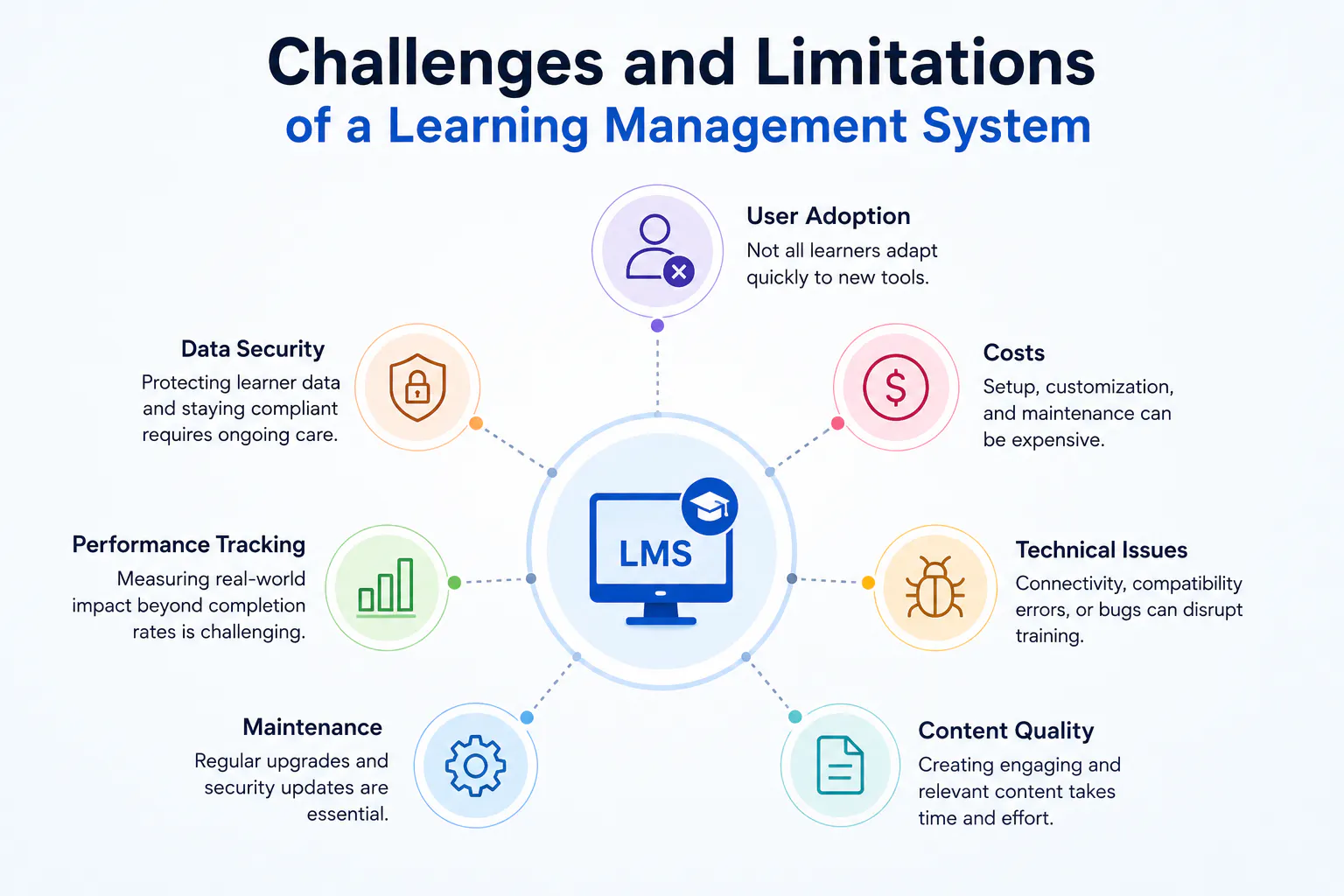
Even though a learning management system improves accessibility and efficiency, implementing an LMS comes with certain challenges.
- User Adoption: Not all learners adapt quickly to new digital tools, which can slow platform engagement and usage.
- Costs: Setup, customization, and maintenance can become expensive over time, especially for smaller organizations.
- Technical Issues: Poor connectivity, compatibility errors, or software bugs can interrupt training and affect learner motivation.
- Content Quality: Creating fresh, interactive, and relevant content requires time, skill, and continuous updates.
- Maintenance: Regular upgrades and security updates are crucial for maintaining the system's stability and compliance.
- Performance Tracking: Measuring the real-world impact of learning beyond completion rates can be difficult.
- Data Security: Protecting learner information and maintaining compliance with data laws requires ongoing vigilance.
How to Choose the Right Learning Platform for Your Business?
To choose the right LMS software starts with matching the platform to your business goals, employee training needs, and existing processes. Before selecting a platform, evaluate these key areas:
- Training goals: Choose a platform that supports onboarding, compliance, employee development, product training, or upskilling.
- Ease of use: Employees should easily access training, while administrators and trainers should be able to manage courses without extensive technical knowledge.
- Course content: Check support for videos, documents, presentations, quizzes, assignments, and structured learning modules.
- Assessments: Look for quizzes, assignments, automatic grading, feedback, and performance evaluation.
- Employee management: The platform should support employee groups, cohorts, course assignments, and role-based learning.
- Progress tracking: Check whether managers and administrators can monitor course completion, assessment results, and employee progress.
- Reporting and insights: Choose reporting tools that help identify training performance, learning gaps, and areas for improvement.
- Scheduling and payments: If your organization runs scheduled or paid training, evaluate the platform's scheduling and payment capabilities.
- AI-powered capabilities: Consider AI features that provide learning insights and help analyze employee training activity.
- Scalability: Select software that can support additional employees, courses, cohorts, and training programs as your business grows.
What Are the Red Flags To Watch For When Choosing An LMS?
Choosing an LMS involves more than comparing features and pricing. The platform should fit your organization’s workflows, users, technology, and learning goals. Watch for these red flags before making a decision:
- Limited integrations — Doesn’t connect well with the business tools your teams already use.
- Poor mobile experience — Makes learning difficult across smartphones and tablets.
- Weak security — Lacks appropriate access controls and data protection.
- Limited reporting — Provides little visibility into learner progress and training outcomes.
- Poor customer support — Makes implementation and ongoing issues harder to resolve.
- Hidden costs — Adds unexpected charges for users, features, integrations, or support.
- Complex interface — Makes basic tasks difficult for administrators, trainers, and employees.
LMS vs Traditional Learning: What Is The Difference?
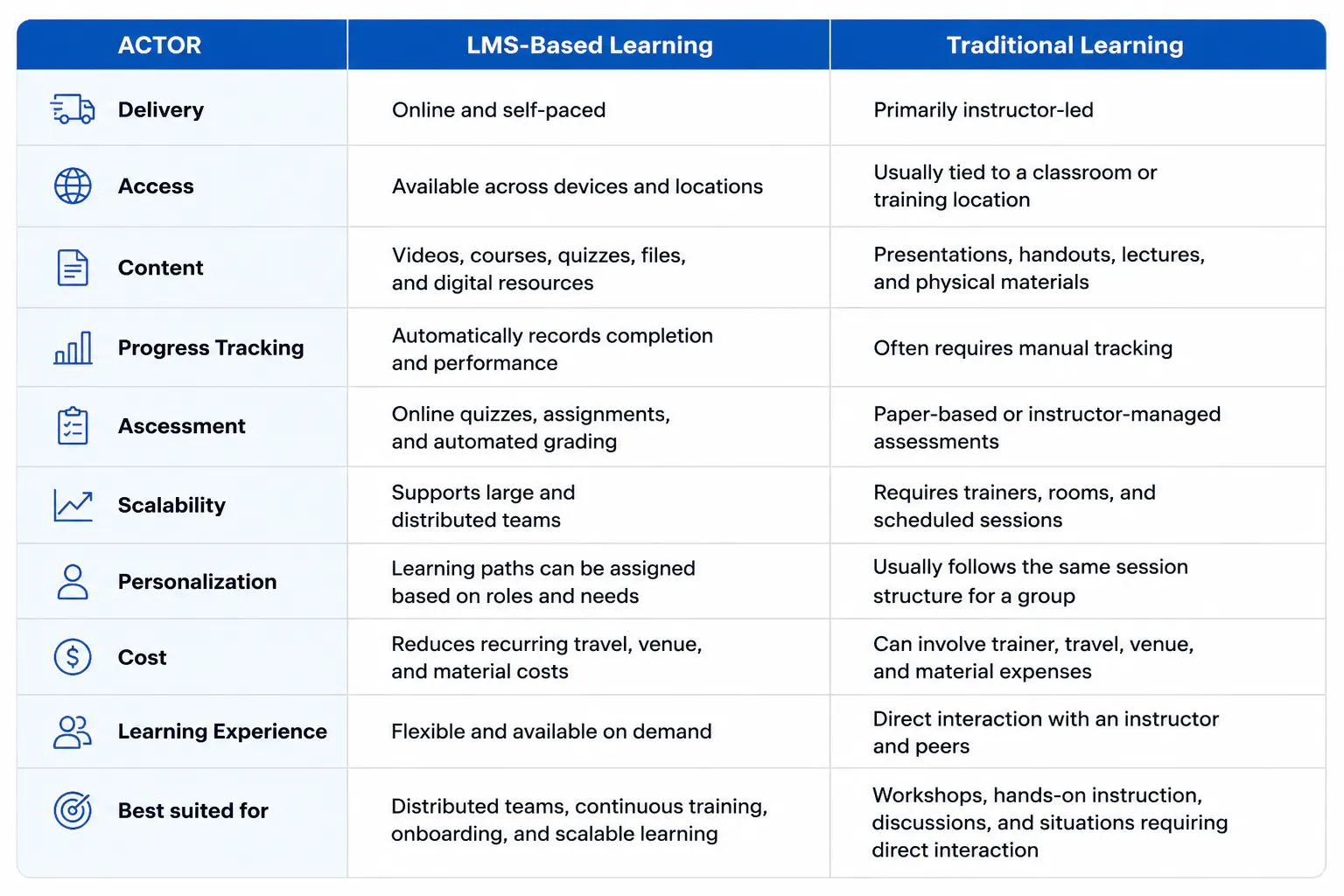
An LMS delivers learning through a digital environment where organizations can create courses, assign training, assess employees, and track progress. Traditional learning usually relies on instructor-led sessions, physical materials, and in-person delivery.
Read more: What is the Difference Between LMS and Traditional Learning Methods?
The Top 5 LMS Trends Shaping 2026
Learning management systems are moving beyond basic course delivery toward AI-assisted learning, skills development, measurable learning outcomes, flexible content delivery, and automated administration. The major trends shaping LMS adoption in 2026 are:
1. AI-Powered Personalized Learning
AI is becoming part of course creation, learner support, assessment, and performance analysis. Modern platforms can use learner activity and assessment results to recommend relevant content, identify knowledge gaps, and support personalized learning paths.
2. Skills-Based Learning And Development
Organizations are increasingly connecting learning with specific skills, job roles, and career development. Instead of measuring success only through course completion, LMS platforms can help identify skill gaps, assign relevant training, and track progress toward professional capabilities.
3. Advanced Learning Analytics
Learning analytics are becoming more important for measuring whether training produces meaningful results. Organizations can use course completion, assessment performance, engagement, and learner activity to identify gaps and improve training programs.
4. Microlearning And Flexible Learning
Microlearning delivers focused lessons around individual concepts, tasks, or skills. Combined with mobile access, it allows employees to complete relevant training in shorter sessions and supports continuous learning alongside regular work.
5. Learning Automation
Automation reduces repetitive work across enrollment, course assignments, assessments, notifications, scheduling, and progress tracking. Rule-based workflows allow administrators to manage recurring training activities while maintaining consistent learning processes.
Conclusion
An LMS provides a structured digital environment for delivering training, managing learning content, assessing employees, and tracking progress, while traditional learning relies more heavily on scheduled, instructor-led sessions.
For organizations with distributed teams, recurring training, employee onboarding, or continuous development needs, an LMS offers greater flexibility, scalability, and visibility. Traditional learning remains useful when direct interaction, discussion, or hands-on instruction is central to the training experience.
The right approach depends on the organization’s learning goals, workforce structure, training requirements, and delivery model.

